Suppression Lists
A suppression list is a named set of addresses that EmailEngine skips when a submission names that list. Add a listId to a mail merge and EmailEngine adds one-click unsubscribe headers, hosts the unsubscribe page, records every opt-out on the list, and leaves those addresses out of later sends to the same list. Your application can write to the same list, which is how hard bounces and complaints are kept out of a campaign.
Nothing needs to be registered first. A list ID you have not used before defines a new list, and removing the last address on a list deletes the list itself.
The admin interface calls the feature Suppression Lists and the API calls it a blocklist (/v1/blocklist); both name the same store.
{ "listId": "weekly-newsletter", "mailMerge": [{ "to": { "address": "subscriber@example.com" } }] }
Everything on this page describes what that field turns on.
Division of labor
Suppression lists cover the unsubscribe half of bulk sending. Your application still owns the list of subscribers.
| EmailEngine handles | Your application handles |
|---|---|
List-ID, List-Unsubscribe and List-Unsubscribe-Post headers | Who is on the list: signup, consent, storage |
| A signed unsubscribe URL for each recipient | Segmentation, scheduling and send volume |
| The hosted unsubscribe and re-subscribe page | Required footer content such as a postal address |
| Storing opt-outs and skipping those recipients on later sends | Reporting beyond EmailEngine's delivery, open and click tracking |
listUnsubscribe and listSubscribe webhooks | Feeding other suppression sources, such as bounces, into the list |
EmailEngine never stores your subscribers, only the addresses that must not be sent to.
Requirements
Set the service URL
The unsubscribe link points back at your EmailEngine instance, so the entire feature depends on the serviceUrl setting. Set it as Service URL under Configuration > General in the admin interface, or over the API:
curl -X POST "https://emailengine.example.com/v1/settings" \
  -H "Authorization: Bearer YOUR_ACCESS_TOKEN" \
  -H "Content-Type: application/json" \
  -d '{"serviceUrl": "https://emailengine.example.com"}'
No headers are added and no suppression check runs, yet the submission still reports success. Recipients who already unsubscribed would receive the message. There is no error to catch, so confirm the setting before your first campaign.
Use mail merge
listId is only accepted alongside mailMerge, and the API rejects it on a plain submission. A merge with a single entry is fine when you want list handling for one recipient. Messages sent without a listId are never checked against any list.
Format the list ID as a hostname
A list ID must be a valid hostname. Valid: newsletter, weekly-updates, campaign-2026. Invalid: my_list (underscore), My List (space), list@example.com (at sign).
Send a campaign
curl -X POST "https://emailengine.example.com/v1/account/example/submit" \
  -H "Authorization: Bearer YOUR_ACCESS_TOKEN" \
  -H "Content-Type: application/json" \
  -d '{
    "listId": "weekly-newsletter",
    "subject": "This week at Example",
    "html": "<p>Hello {{name}},</p><p>Here is what changed at Example this week.</p><p><a href=\"{{rcpt.unsubscribeUrl}}\">Unsubscribe</a></p>",
    "mailMerge": [
      { "to": { "address": "alice@example.com", "name": "Alice" }, "params": { "name": "Alice" } },
      { "to": { "address": "bob@example.com", "name": "Bob" }, "params": { "name": "Bob" } }
    ]
  }'
Read the response
{
  "mailMerge": [
    {
      "success": true,
      "to": { "address": "alice@example.com", "name": "Alice" },
      "messageId": "<a2184d08-a470-fec6-a493-fa211a3756e9@example.com>",
      "queueId": "d41f0423195f271f"
    },
    {
      "success": true,
      "to": { "address": "bob@example.com", "name": "Bob" },
      "skipped": { "reason": "unsubscribe", "listId": "weekly-newsletter" }
    }
  ]
}
Suppressed recipients come back with success: true and a skipped object instead of a messageId and queueId. Nothing was queued for them, and this is not an error. skipped.reason echoes the reason stored on the list entry: unsubscribe for an opt-out, or whatever reason your application gave when it added the address itself. Count the skipped entries if you want to track how much of a list has opted out.
What the message carries
List-ID: <weekly-newsletter.emailengine.example.com>
List-Unsubscribe: <https://emailengine.example.com/unsubscribe?data=eyJhY3Qi...&sig=Ah0z...>
List-Unsubscribe-Post: List-Unsubscribe=One-Click
List-IDcombines your list ID with the hostname fromserviceUrl.List-Unsubscribeis a signed URL unique to this recipient and this list. It answers both as a page (GET) and as a one-click target (POST).List-Unsubscribe-Postmarks the link as RFC 8058 one-click, which is what Gmail and Yahoo require from bulk senders.
EmailEngine also generates a Message-ID when the submission does not provide one, so every opt-out can be traced back to the message that caused it.
The recipient context
Setting a listId turns on Handlebars rendering for subject, text, html and previewText, even for entries with no params. Alongside your own merge parameters, each message gets an rcpt object:
| Variable | Value |
|---|---|
{{rcpt.unsubscribeUrl}} | Signed unsubscribe URL for this recipient |
{{rcpt.address}} | Recipient email address |
{{rcpt.name}} | Recipient display name, when the merge entry supplies one |
Put the unsubscribe link in the message body as well as the header, since not every mail client surfaces the header version. Click tracking deliberately leaves this URL alone, so the link a recipient clicks is always the real one.
Because rendering is always on for list sends, literal {{ in your content needs escaping. See Template escaping.
What the recipient sees
There are two routes out, and both end in the same place:
- The mail client's own unsubscribe button. Gmail, Apple Mail, Outlook.com and others show it because of the one-click headers. The client posts to EmailEngine directly and the recipient never leaves their inbox.
- The link in the message body. Opens the hosted page, where the recipient confirms.
The hosted page has three states: confirm the unsubscribe, unsubscribed with an offer to re-subscribe, and subscription resumed. A mistaken unsubscribe is therefore self-service to undo, with no support ticket and no work on your side.
The page is localized and follows the recipient's browser language, falling back to your configured default locale. Style it under Configuration > Branding, where the brand name, a header template and custom <head> markup apply to every public page.
React to opt-outs
| Webhook | Fires when |
|---|---|
listUnsubscribe | A recipient adds their address to the list, through the one-click request their mail client sends or through the hosted page |
listSubscribe | A recipient re-subscribes on the hosted page |
Both carry the list ID, the recipient, the originating messageId, and the IP address and user agent behind the request.
app.post('/webhooks/emailengine', (req, res) => {
  res.json({ success: true }); // acknowledge first, then process

  const { event, data } = req.body;

  if (event === 'listUnsubscribe') {
    subscribers.setStatus(data.recipient, data.listId, 'unsubscribed');
  } else if (event === 'listSubscribe') {
    subscribers.setStatus(data.recipient, data.listId, 'subscribed');
  }
});
Three behaviors are worth knowing when you write that handler:
- Events fire only on an actual change. Unsubscribing an already suppressed address is a silent no-op, so a mail client that retries its one-click request will not produce duplicate events.
- Only the recipient's own actions fire them. Adding an address through the API or the admin interface does not send
listUnsubscribe, and removing one does not sendlistSubscribe; only the hosted page's re-subscribe counts as one. - The suppression is stored before the webhook goes out. The event is then delivered like any other webhook, with the usual retries. If queuing it fails, the failure is logged and the suppression stands. Treat webhooks as a signal to update your own records rather than as the record itself. EmailEngine's list is the authority and you can read it back at any time.
Manage the lists
Suppression Lists in the admin interface side menu shows every list that exists, with the number of addresses on each. A list appears here the moment its first address is suppressed.
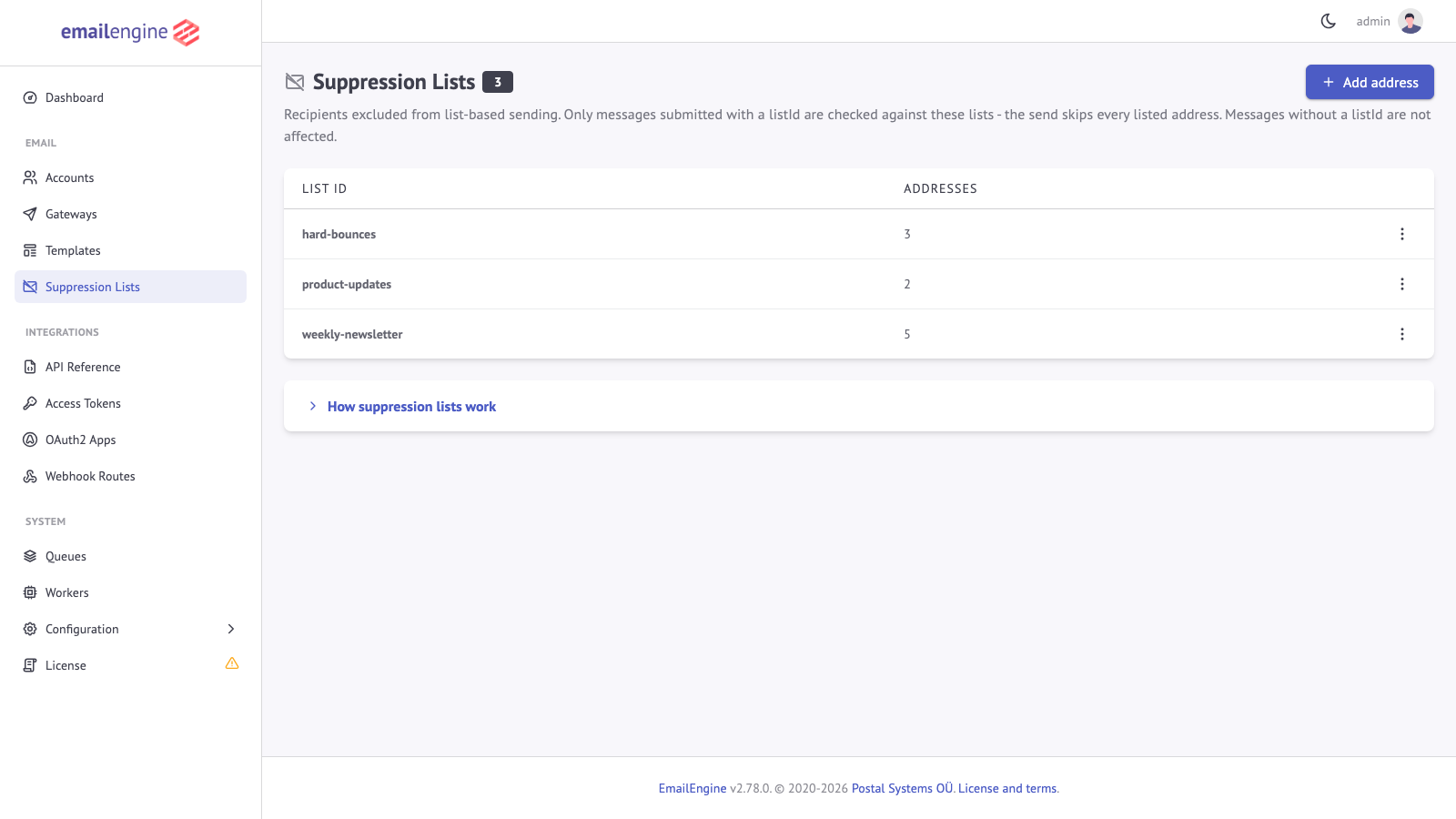
Opening a list shows what was recorded for each address: why it was suppressed, how it got there, the account that was sending, and when.
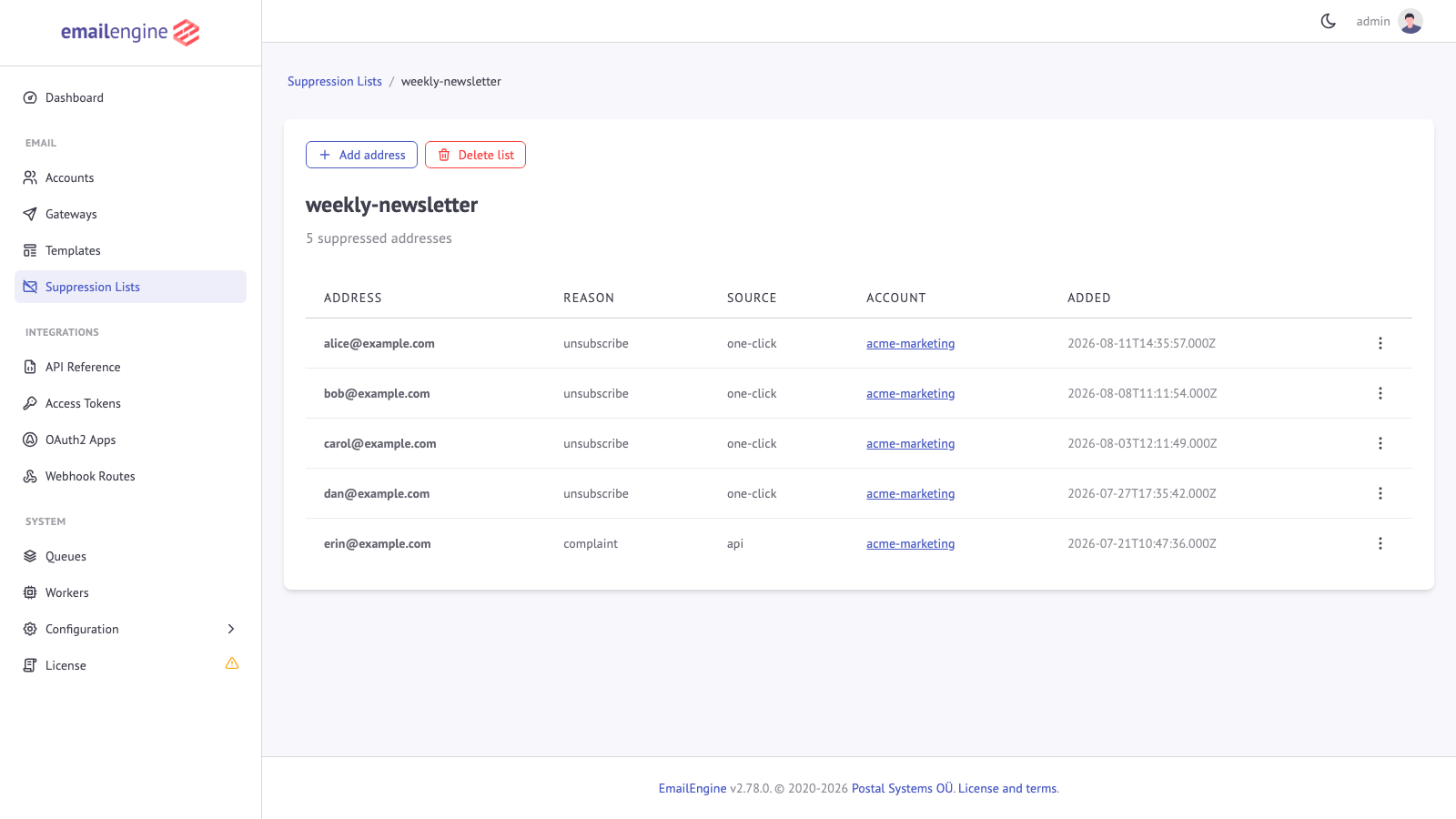
From these pages you can add or remove addresses (Add address, and the actions menu of a row), open a recipient's subscription page, and delete a list outright (Delete list). The same operations, apart from deleting a whole list, are available over the API:
| Operation | Endpoint |
|---|---|
| All lists with entry counts | GET /v1/blocklists |
| Entries on one list | GET /v1/blocklist/{listId} |
| Suppress an address | POST /v1/blocklist/{listId} |
| Release an address | DELETE /v1/blocklist/{listId} |
List all lists
curl "https://emailengine.example.com/v1/blocklists" \
  -H "Authorization: Bearer YOUR_ACCESS_TOKEN"
{
  "total": 3,
  "page": 0,
  "pages": 1,
  "blocklists": [
    {"listId": "bounce-hard", "count": 8},
    {"listId": "product-updates", "count": 15},
    {"listId": "weekly-newsletter", "count": 42}
  ]
}
Lists are sorted by ID. page (zero-based, default 0) and pageSize (default 20, at most 1000) page the result.
List the entries on a list
curl "https://emailengine.example.com/v1/blocklist/weekly-newsletter?pageSize=50" \
  -H "Authorization: Bearer YOUR_ACCESS_TOKEN"
{
  "listId": "weekly-newsletter",
  "total": 42,
  "page": 0,
  "pages": 1,
  "addresses": [
    {
      "recipient": "bob@example.com",
      "account": "user123",
      "source": "one-click",
      "reason": "unsubscribe",
      "messageId": "<abc@example.com>",
      "remoteAddress": "198.51.100.24",
      "userAgent": "Mozilla/5.0 (Macintosh; Intel Mac OS X 10_15_7)",
      "created": "2024-10-13T12:10:40.980Z"
    }
  ]
}
A list that does not exist answers 404. Each entry carries:
| Field | Description |
|---|---|
recipient | The suppressed address. Matching is on the lowercased, trimmed address; the stored record echoes it as submitted |
account | Account the entry was recorded for. Absent for entries added from the admin interface, which are not bound to an account |
source | How the entry was added: one-click (the mail client's unsubscribe button), form (the hosted unsubscribe page), api (POST /v1/blocklist/{listId}) or admin (the admin interface) |
reason | Why the address was suppressed. unsubscribe for the two unsubscribe paths, the reason given to the API or typed into the admin form, or block when neither gave one |
messageId | Message-ID of the message the recipient unsubscribed from (unsubscribe entries only) |
remoteAddress, userAgent | The client that triggered the entry. For a one-click entry this is the recipient's mail provider, for an api entry the caller of the API |
created | When the entry was added, or last rewritten |
Add an address
curl -X POST "https://emailengine.example.com/v1/blocklist/weekly-newsletter" \
  -H "Authorization: Bearer YOUR_ACCESS_TOKEN" \
  -H "Content-Type: application/json" \
  -d '{
    "account": "user123",
    "recipient": "spam-reporter@example.com",
    "reason": "complained"
  }'
{
  "success": true,
  "added": true
}
account is required, and the request answers 404 when no such account exists. added is false when the address was already on the list; the entry is still rewritten with the new reason, account and timestamp. reason is optional and defaults to block; whatever you store here is what a later send echoes as skipped.reason.
Remove an address
curl -X DELETE "https://emailengine.example.com/v1/blocklist/weekly-newsletter?recipient=bob@example.com" \
  -H "Authorization: Bearer YOUR_ACCESS_TOKEN"
{
  "deleted": true
}
deleted is false when the address was not on the list. A list that does not exist answers 404.
Feed bounces into a list
Adding addresses yourself is how other suppression sources reach a list. The usual one is a hard bounce: when a messageBounce webhook arrives with a classification that says the address is gone, add the recipient to the list your campaigns name.
app.post('/webhooks/emailengine', (req, res) => {
  res.json({ success: true });

  const { event, account, data } = req.body;
  if (event !== 'messageBounce') {
    return;
  }

  // The classifier recommends "remove" for addresses that will never accept mail
  if (data.response && data.response.recommendedAction === 'remove') {
    fetch('https://emailengine.example.com/v1/blocklist/weekly-newsletter', {
      method: 'POST',
      headers: {
        'Authorization': 'Bearer YOUR_ACCESS_TOKEN',
        'Content-Type': 'application/json'
      },
      body: JSON.stringify({
        account,
        recipient: data.recipient,
        reason: 'hard-bounce'
      })
    });
  }
});
Bounce Detection describes the classification fields and the full set of recommended actions.
Limits to plan around
- One list per submission. A merge is checked against a single
listId. To honor several suppression sources, write them all to the one list your campaigns name, as the bounce example above does, or filter in your own application before submitting. - Suppression is per list. Opting out of
product-updateshas no effect onweekly-newsletter. That is what makes granular preferences possible, and it also means a global opt-out is your application's job. - Unsubscribe links do not expire. They stay valid as long as the service secret does. Rotating or losing that secret breaks the links in mail that has already been delivered.
- Addresses are stored lowercased and trimmed, so matching is case-insensitive.
- No campaign tooling. There is no contact storage, segmentation, A/B testing or list analytics. Suppression lists suit an application that already has those and needs compliant unsubscribe handling.
See Also
- Mail Merge - Personalized bulk sending, the delivery mechanism behind list sends
- Bounce Detection - The classification that tells you which bounced addresses to suppress
- listUnsubscribe and listSubscribe - Full webhook payloads
- Translations - The languages the hosted unsubscribe page is available in