Model Context Protocol (MCP)
EmailEngine ships an MCP server. Point an AI agent at POST /mcp, hand it an access token, and the agent can list mailboxes, search and read messages, file them, draft replies and send mail through the email accounts you have already connected. With a management credential it can also operate the instance itself: add and reconnect accounts, change settings, manage OAuth2 applications, gateways and templates, and inspect tokens, logs and the license.
MCP is the protocol AI clients use to discover and call external tools. EmailEngine implements the server half of it, so any MCP-capable client - a desktop assistant, a coding agent, a web connector, your own application built on an agent framework - can work with email without you writing an integration for each one.
MCP support shipped in EmailEngine v2.79.2 (2026-08-22) as a labeled beta, and the management tools with their own mcp-manage scope followed in v2.80.1 (2026-09-10). The endpoint is off by default, and the tool set may still change between releases. Everything below is stable enough to build on, but pin a version if you need the tool list to be frozen.
What an agent can do
The endpoint exposes two curated tool sets, each behind its own token scope. The mail tools work with the contents of the accounts registered on the instance:
| Area | Tools |
|---|---|
| Accounts | list_accounts, get_account |
| Folders | list_mailboxes |
| Reading | list_messages, search_messages, get_message, get_message_text, get_attachment |
| Organizing | update_message, move_message, delete_message |
| Writing | create_draft, send_message |
| Sending queue and templates | get_outbox, list_templates |
The management tools operate the instance, and a token needs the mcp-manage scope to be offered any of them:
| Area | Tools |
|---|---|
| Accounts | create_account, update_account, delete_account, reconnect_account, sync_account, flush_account, get_account_logs, create_account_setup_link, verify_account_settings, autodiscover_settings |
| Settings and queues | get_settings, update_settings, get_queue, set_queue_state, cancel_queued_message |
| OAuth2 applications | list_oauth2_apps, get_oauth2_app, create_oauth2_app, update_oauth2_app, delete_oauth2_app, verify_oauth2_app, get_pubsub_status |
| SMTP gateways | list_gateways, get_gateway, create_gateway, update_gateway, delete_gateway |
| Templates, suppression lists, webhook routes | create_template, update_template, delete_template, delete_account_templates, list_blocklists, get_blocklist, add_to_blocklist, remove_from_blocklist, list_webhook_routes, get_webhook_route |
| Access tokens, license, diagnostics | list_tokens, get_token, get_token_log, revoke_token, get_license, set_license, get_instance_stats, check_delivery_test |
Nothing in either set mints a token or reads a stored credential; see What an MCP credential can never do.
Each connected account is also published as an MCP resource (emailengine://account/{account}), so clients that browse resources can see what the credential reaches without calling a tool.
See the Tools Reference for arguments, results and the REST endpoint behind each tool.
How it works
An MCP tool call is an EmailEngine API request. The endpoint parses JSON-RPC, resolves the named tool to the route it wraps, and dispatches that route in-process with the caller's own credential:
Four consequences worth knowing up front:
- Nothing bypasses REST enforcement. Scopes, permission narrowing, account binding, IP and referrer restrictions, rate limits and the token audit log all apply to a tool call exactly as they apply to the equivalent REST call.
- The agent never receives mail credentials. IMAP passwords and OAuth2 refresh tokens stay in EmailEngine. The agent holds an EmailEngine access token, which you can narrow and revoke at any time.
- The tool list is per credential.
tools/listonly advertises tools the calling token can actually use: a token holding one MCP scope is not offered the other scope's tools, a narrowed token loses the tools its record refuses, and an agent does not plan around a call that would come back as a 403. A token bound to one account gets simpler tools too: they stop asking which account to act on. - Bodies arrive ready to read. Message text comes back as sanitized HTML with quoted reply history wrapped in a marked element, so a model can tell what the sender wrote this time from the thread quoted under it. See Message bodies.
MCP or the REST API?
Both surfaces reach the same mailboxes, through the same enforcement. They answer different questions.
| MCP | REST API | |
|---|---|---|
| Caller | An AI agent deciding what to call | Code you wrote, calling what you decided |
| Surface | Two curated tool sets, one for mail and one for the instance | Every endpoint |
| Discovery | The client fetches the tool list and schemas | You read the docs and write the calls |
| Best for | Assistants, inbox triage, drafting, ad-hoc questions about a mailbox | Applications, sync pipelines, transactional sending |
Build a product feature on the REST API. Use MCP when the caller is a model that has to choose the operation itself.
Enable the endpoint
MCP is behind two switches, and both have to be on.
1. The deployment gate
EENGINE_MCP_ENABLED decides whether the /mcp routes are registered at all. It defaults to true, so there is usually nothing to do here. Set it to false to compile the surface out of an instance entirely - the routes then do not exist and the settings below have no effect:
EENGINE_MCP_ENABLED=false
The equivalent config file setting is [mcp] enabled = false, and the CLI flag is --mcp.enabled=false. Changing it requires a restart.
2. The runtime setting
mcpEnabled is the switch you actually flip. It starts out off, so a fresh instance never exposes a new surface until someone turns it on. In the admin interface, open Configuration > MCP and tick Enable the MCP endpoint:
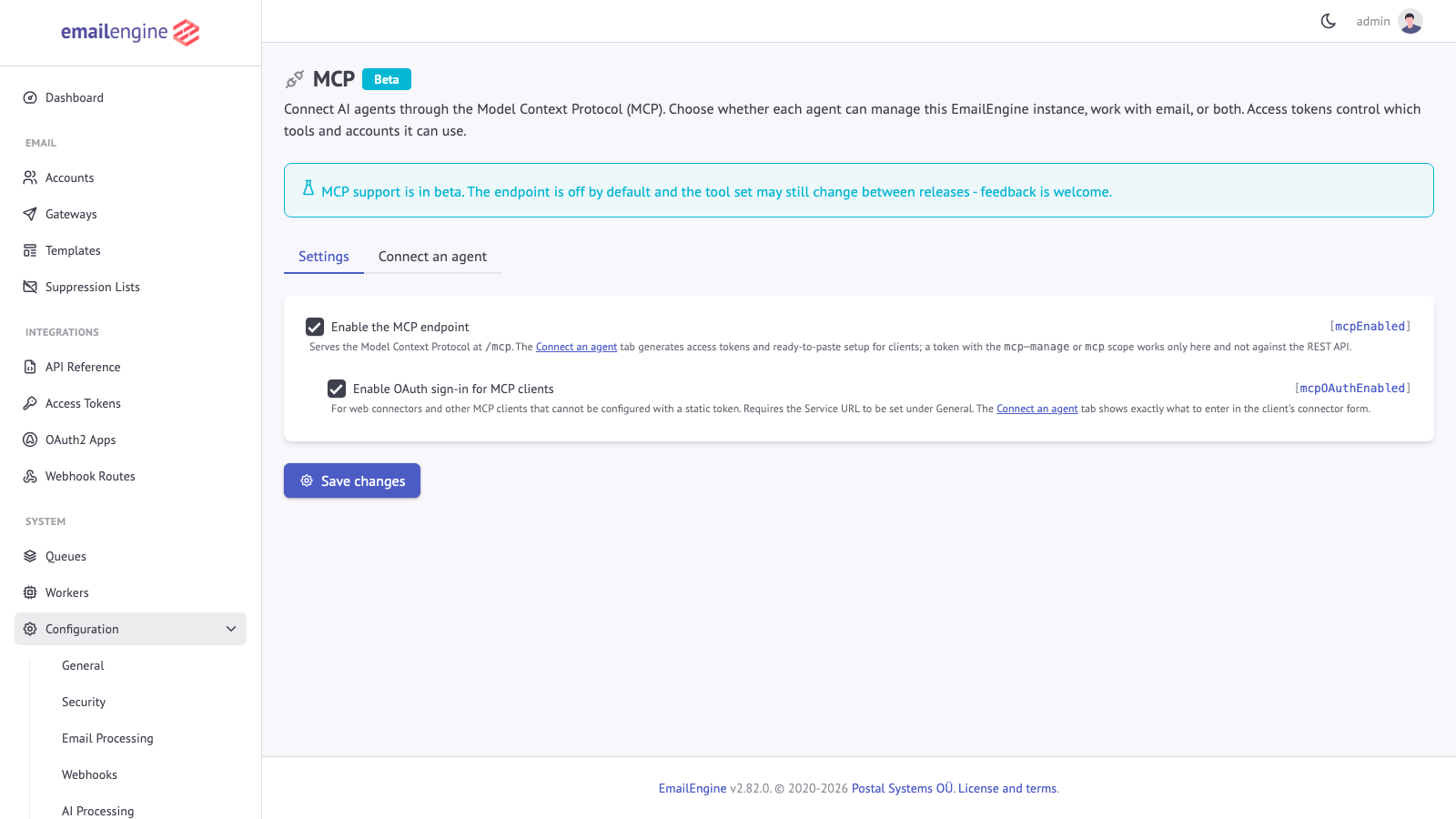 Configuration > MCP: the endpoint switch, and the OAuth sign-in switch used by web connectors
The same setting over the API:
curl -X POST "https://emailengine.example.com/v1/settings" \
  -H "Authorization: Bearer $EE_TOKEN" \
  -H "Content-Type: application/json" \
  -d '{ "mcpEnabled": true }'
Or as prepared settings at startup:
EENGINE_SETTINGS='{"mcpEnabled":true}'
The second checkbox, Enable OAuth sign-in for MCP clients, is only needed for clients that cannot be configured with a token you paste in. See Connecting Agents.
Both switches are among the settings a narrowed token may never read or write, so an agent connected over MCP cannot turn the endpoint or OAuth sign-in on for itself, whatever its management level.
While the endpoint is off, every request to it answers 404 with a message naming the switch:
{
  "statusCode": 404,
  "error": "Not Found",
  "message": "MCP support is not enabled on this instance. An admin can turn it on under Configuration > MCP, or by setting mcpEnabled"
}
Check that it works
Any access token that opens the endpoint will do for a smoke test. ping is the cheapest call in the protocol:
curl -X POST "https://emailengine.example.com/mcp" \
  -H "Authorization: Bearer $EE_TOKEN" \
  -H "Content-Type: application/json" \
  -H "MCP-Protocol-Version: 2025-06-18" \
  -d '{ "jsonrpc": "2.0", "id": 1, "method": "ping" }'
{ "jsonrpc": "2.0", "id": 1, "result": {} }
Then ask for the tool catalog the way a client would:
curl -X POST "https://emailengine.example.com/mcp" \
  -H "Authorization: Bearer $EE_TOKEN" \
  -H "Content-Type: application/json" \
  -H "MCP-Protocol-Version: 2025-06-18" \
  -d '{ "jsonrpc": "2.0", "id": 2, "method": "tools/list" }'
If the response lists fewer tools than you expect, that is the per-credential filtering at work - see Access Control.
Requirements
- A running EmailEngine instance with at least one connected account. MCP adds a surface over accounts you have already registered; it does not add accounts. See Adding Email Accounts.
- HTTPS for anything not on localhost. MCP clients send a bearer token on every request, and hosted connectors will not accept a plain HTTP endpoint. Put EmailEngine behind a TLS-terminating proxy.
- A Service URL (Configuration > General) if you plan to use OAuth sign-in. The OAuth metadata has to publish a fixed public address, which a request-derived one cannot provide.
Where to go next
- Connecting Agents - generate a token, paste the configuration into a client, or let a web connector sign itself in
- Tools Reference - every tool, its arguments and what it returns
- Access Control - scopes, access levels, account binding and what an agent can never reach
- Protocol Reference - protocol revisions, methods, error codes and the OAuth endpoints, for client developers
See Also
- Access Tokens - how EmailEngine credentials work in general
- Adding Email Accounts - connecting the mailboxes an agent will work with
- AI and ChatGPT Integration - EmailEngine's built-in AI processing of incoming mail, which is a different feature
- API Reference - the REST surface each tool dispatches to