Access Tokens
Access tokens are required to authenticate all API requests to EmailEngine. This guide covers token types, creation methods, security best practices, and management strategies.
Overview
What are Access Tokens
Access tokens are 64-character hexadecimal strings that authenticate API requests. EmailEngine supports two types of tokens:
- System-wide tokens: Full access to all EmailEngine endpoints and all accounts
- Account-specific tokens: Restricted to operations on a single account
Either kind can additionally carry a permissions record that narrows what it may do. A system-wide token minted over the API must carry one.
Token Format
All tokens are 64-character hexadecimal strings (32 bytes):
f05d76644ea39c4a2ee33e7bffe55808b716a34b51d67b388c7d60498b0f89bc
Token ID
EmailEngine stores only the SHA-256 hash of each token, never the token value itself. This hash is the token's stable identifier:
- Returned as the
idfield byGET /v1/tokens(add?account={account}to list one account's tokens) - Shown in the admin UI access tokens list as the "Token ID" column (first 8 hex characters, full hash on hover)
- Included in log entries, so API requests can be correlated to the token that made them
The token value cannot be recovered from the id. DELETE /v1/tokens/{token} accepts either the original token value or the token id.
Token Types
System-Wide Tokens
Created via:
- Web interface (Integrations > Access Tokens)
- CLI:
emailengine tokens issue - API:
POST /v1/tokenswithout anaccount, which then requires apermissionsrecord
Characteristics:
- Access all accounts
- Access all API endpoints, unless narrowed by
permissions - Can create other tokens, unless narrowed by
permissions - Can optionally be scoped to specific account using
-aflag in CLI - Recommended for administrative tasks
Example use cases:
- Account management (create, update, delete accounts)
- System configuration
- Multi-account operations
- Administrative automation
Account-Specific Tokens
Created via:
- API:
POST /v1/tokens(with anaccountfield)
Characteristics:
- Bound to single account
- Can only access that account's data
- Cannot create other tokens
- Cannot access system-wide endpoints: any route that has no
{account}in its path is refused with403 Unauthorized account - Recommended for user-facing applications
Example use cases:
- Per-user API access in multi-tenant applications
- Limited scope for third-party integrations
- Security-sensitive deployments
Important: A token minted over the API must be narrowed: either bind it to an account, or send a permissions record. The API declines to mint an instance-wide token that can reach every account and every endpoint - create those in the web interface or with the CLI.
Creating Tokens
Method 1: Web Interface
Best for: Manual token creation, administrative tokens
- Log in to EmailEngine web interface
- Navigate to Integrations > Access Tokens
- Click Create access token
- Enter a description, optionally bind the token to an account, select scopes, and narrow it with Restrict what this token can do if needed
- Click Generate a token
- Copy the token (shown only once)
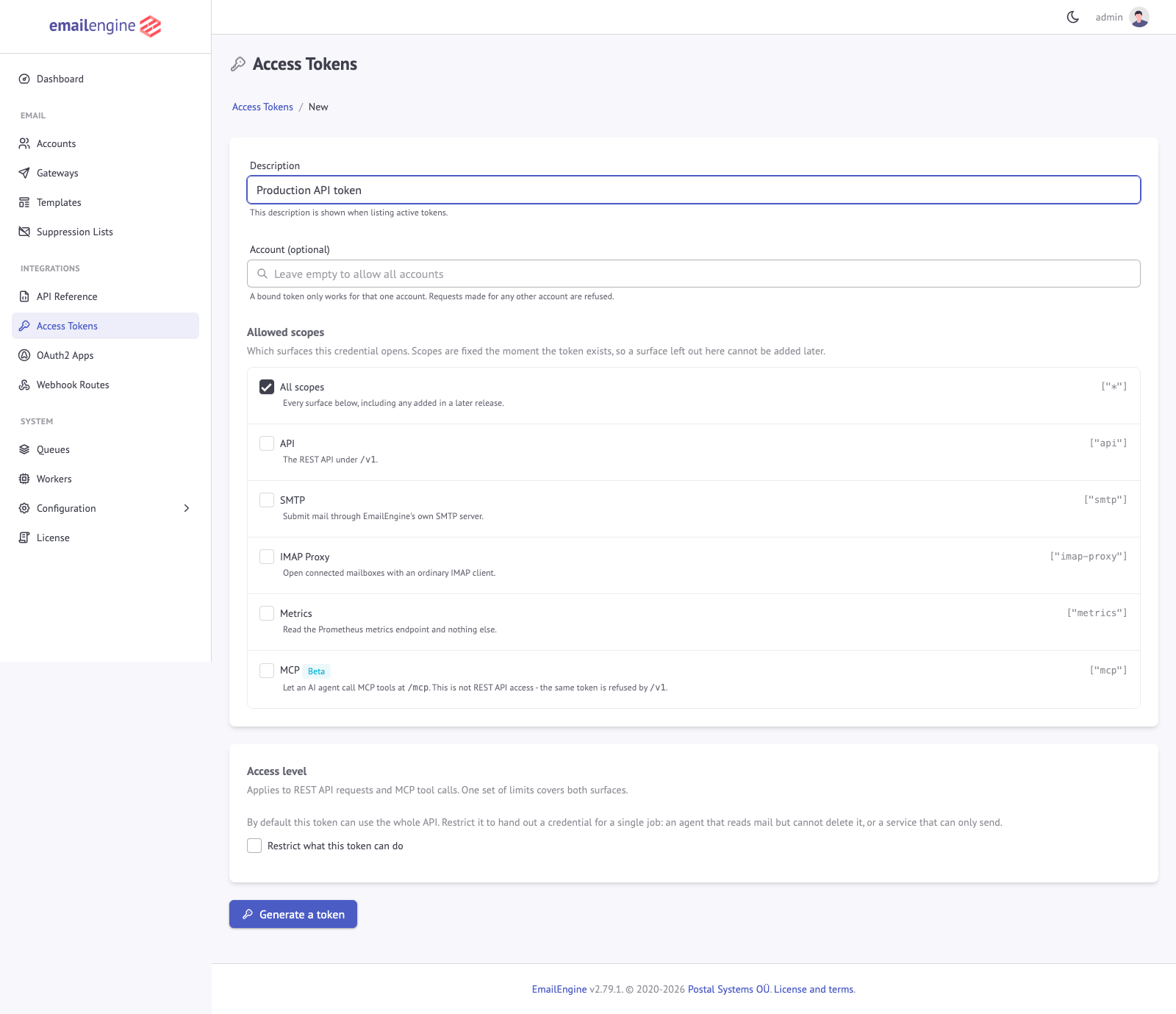 The token form takes a description, an optional account binding and the allowed scopes, and can narrow what the token may do. The generated token value is shown only once
Pros:
- Simple and intuitive
- Visual scope selection
- Immediate feedback
Cons:
- Requires manual interaction
- Not suitable for automation
Method 2: CLI
Best for: Automation, CI/CD, Docker deployments, infrastructure-as-code
The EmailEngine CLI provides commands to generate, export, import, and manage tokens programmatically. This is particularly useful for automated deployments and prepared token configuration.
For complete CLI usage, installation, and configuration options, see the Command Line Interface (CLI) documentation.
Generate system-wide token:
emailengine tokens issue \
  -d "My admin token" \
  -s "*" \
  --dbs.redis="redis://127.0.0.1:6379/8"
Generate account-specific token:
emailengine tokens issue \
  -d "User token" \
  -s "api" \
  -a "user123" \
  --dbs.redis="redis://127.0.0.1:6379/8"
Output:
f05d76644ea39c4a2ee33e7bffe55808b716a34b51d67b388c7d60498b0f89bc
Without -s the CLI issues a * token, and without -d the description is Generated at <timestamp>.
For detailed CLI usage, export/import workflows, and prepared token configuration for automated deployments, see Prepared Tokens.
Method 3: API
Best for: Programmatic token creation, multi-tenant applications
Endpoint: POST /v1/tokens
Authentication: Requires an instance-wide token with the * or api scope and no permissions record. Token provisioning is in the never-grantable admin group, so an account-bound token is refused (the route has no {account} parameter) and a narrowed token is refused whatever it lists. A request made while API authentication is switched off is refused too, since nothing could ever revoke a token handed to an anonymous caller.
The new token can also not be less restricted than the token minting it. When the calling token carries an address allowlist, a referrer allowlist, a rate limit or an expiry, the request has to repeat each of them at least as narrowly: restrictions.addresses within the caller's allowlist, restrictions.referrers as a subset of the caller's list, a rateLimit no higher, and an expires no later. A request that would widen any of them is refused with 403 and the code MintWidensRestrictions. Since EmailEngine 2.82.0; earlier releases minted the token as requested.
curl -X POST https://emailengine.example.com/v1/tokens \
  -H "Authorization: Bearer EXISTING_TOKEN" \
  -H "Content-Type: application/json" \
  -d '{
    "account": "user123",
    "description": "User API token",
    "scopes": ["api"]
  }'
Fields:
description(string, required): Token descriptionscopes(array): Token scopes, default["api"]. One or more ofapi,smtp,imap-proxy,mcpandmcp-manageaccount(string): Account ID this token is bound topermissions(object):actionsandgroupsallowlists, or agrantspair list, see Permissionsrestrictions(object): IP, referrer and rate limits, see Token Restrictionsmetadata(string): Arbitrary JSON, stored with the token and returned byGET /v1/tokens/{token}expires(date-time): When the token stops working. Omit for a token that never expires. An expired token is refused and its record is removed the next time it is presented or listed
Either account or permissions has to be present.
Response:
{
  "token": "f05d76644ea39c4a2ee33e7bffe55808b716a34b51d67b388c7d60498b0f89bc",
  "id": "1bc12baf7f0d5e51fe0a4e0eda06e1be5b8d6cc2c66b95dc0fbe4d2e9f5d5e1a"
}
Important notes:
- The token value is returned once and stored hashed. The
idis what the listings report afterwards - An unbound token must carry a
permissionsrecord; without one the request is refused - You need an existing instance-wide token that is not narrowed to mint tokens, and the new token inherits no restriction from it: every limit has to be repeated in the request
EmailEngine 2.79.0 renamed the token endpoints. POST /v1/token, DELETE /v1/token/{token} and GET /v1/tokens/account/{account} still answer, with the same handlers as POST /v1/tokens, DELETE /v1/tokens/{token} and GET /v1/tokens?account=user123, so existing integrations keep working, but they are left out of the OpenAPI document and the API reference. Use the new paths.
Token Scopes
Scopes define what a token can access:
| Scope | Description | Access | Available via |
|---|---|---|---|
* | Full access | All API endpoints, all operations | Web UI, CLI only |
api | API access only | Standard API calls, no metrics | Web UI, CLI, API |
metrics | Metrics only | Prometheus metrics endpoint only | Web UI, CLI only |
smtp | SMTP proxy | SMTP gateway access | Web UI, CLI, API |
imap-proxy | IMAP proxy | IMAP proxy access | Web UI, CLI, API |
mcp | MCP mail tools | The mail tools at /mcp, and nothing on the REST API | Web UI, CLI, API |
mcp-manage | MCP management tools | The instance management tools at /mcp, and nothing on the REST API. Since 2.80.1 | Web UI, API |
When creating tokens via the POST /v1/tokens API endpoint, only the api, smtp, imap-proxy, mcp and mcp-manage scopes are available. The * (full access) and metrics scopes can only be assigned through the Web UI or CLI, and the CLI does not issue mcp-manage.
A token carrying mcp or mcp-manage opens the MCP endpoint and is refused by /v1 with an "Unauthorized scope" error. Inside MCP each scope admits only the operations its own tools wrap. mcp covers the mail tools: reading accounts, folders, messages, the sending queue and templates, modifying and deleting messages, and sending mail. mcp-manage covers the instance management tools: accounts, settings, OAuth2 applications, gateways, tokens, the license, blocklists, templates, the queues, logs and statistics. Neither can mint a token or read a stored credential. See MCP Access Control.
Multiple scopes:
{
  "scopes": ["api", "smtp"]
}
Default scope: ["api"] over the API, ["*"] from the CLI.
The smtp, imap-proxy and metrics scopes are checked once, at login, and then hand over a session. A token that also carries a permissions record is admitted to them only if the record covers everything that session could do: send on submit for SMTP, read on diagnostics for metrics, and for the IMAP proxy read, write and destructive on message plus write and destructive on mailbox, because a proxied IMAP session can delete and expunge. The two MCP scopes are checked per request instead: a tool call goes through when any one pair in the scope's table covers the route it dispatches, so a record that leaves a single pair allowed still yields a usable token. The token form warns when a chosen scope would be unusable with the record.
Permissions
A permissions record narrows a token below its scope. It only ever subtracts: no value in it grants anything the token's scope and account binding do not already allow. It is written in one of two forms.
Two axes (since EmailEngine 2.79.0). actions says what the token may do and groups what it may touch. Both are allowlists and both apply together, so an operation is allowed only when its action is in actions and its group is in groups:
{
  "description": "Read-only mail access",
  "scopes": ["api"],
  "permissions": {
    "actions": ["read"],
    "groups": ["account", "mailbox", "message"]
  }
}
Omit actions to allow every action. Omit groups to allow the thirteen groups that existed when this form shipped (account, mailbox, message, submit, outbox, export, template, blocklist, webhook, gateway, events, diagnostics and logs). The five instance groups added in 2.80.1 are not implied by an absent groups axis and have to be named, so a record written for 2.79 keeps exactly the reach it had.
Exact pairs (since EmailEngine 2.80.1). grants lists the (action, group) pairs the token may perform, for a narrowing the two axes cannot express, such as reading one section while writing another. It stands alone: a record that sets grants beside actions or groups is refused.
{
  "description": "Reads mail, manages templates",
  "scopes": ["api"],
  "permissions": {
    "grants": [
      { "action": "read", "group": "mailbox" },
      { "action": "read", "group": "message" },
      { "action": "write", "group": "template" }
    ]
  }
}
POST /v1/tokens refuses an empty record, an empty array and a value outside the vocabulary, because a record that lists nothing allows nothing. A record that reaches a token another way, such as a prepared token, and cannot be read denies every request (malformed in the audit log) rather than being ignored.
Actions, one per operation:
| Action | Allows |
|---|---|
read | Read data without changing anything |
write | Create or modify data |
send | Hand a message to a mail server, so it reaches real recipients |
destructive | Call the endpoints that remove data. Deleting a message is a move to Trash, which a write grant can perform directly, so withholding this narrows the endpoints rather than the outcome for mail |
Groups, one per operation:
| Group | Covers |
|---|---|
account | Reading accounts and operating on their connection state: list, get, delete, reconnect, sync, flush, server signatures. Creating an account and editing its configuration are provisioning |
mailbox | Create, rename, delete and list mailbox folders |
message | Read, modify, move and delete messages, including bulk actions and search |
submit | Send email, including scheduled sends and the delivery test. A send may reference a stored message to forward it, so this also reads the message it names |
outbox | Inspect and cancel queued outbound messages |
export | Bulk export an account. One call archives every folder, so this is separate from message access |
template | Manage stored email templates |
blocklist | Manage suppression lists |
webhook | Read webhook route definitions |
gateway | Read and delete SMTP gateways. Creating or editing one is provisioning, because it can redirect where stored relay credentials are sent |
events | Subscribe to the instance-wide change stream, which covers every account |
diagnostics | Read statistics and service status, the delivery test result, the Pub/Sub status, credential-free autodiscovery (GET /v1/autoconfig) and /metrics |
logs | Read the per-account stored log. Entries are the protocol or API trace, so they include folder names and message subjects |
settings | Read and change instance settings and pause or resume the queues. A write reaches the global webhook target. The privileged keys below are refused. Since 2.80.1 |
oauth2 | Manage OAuth2 applications. Secrets are write-only, and a change can move where the provider sends authorization codes. Since 2.80.1 |
license | Read, apply and remove the license key. Since 2.80.1 |
token | List, inspect and revoke access tokens and read their audit logs. Cannot create tokens. Since 2.80.1 |
provisioning | Add and reconfigure accounts and SMTP gateways, including where they connect (POST /v1/account, PUT /v1/account/{account}, POST /v1/gateway, PUT /v1/gateway/edit/{gateway}), mint a hosted authentication link, verify credentials, and autodiscovery with credentials (POST /v1/autoconfig). A stored credential is sent to whatever host the record names after the change. Since 2.80.1 |
Every operation in the API reference publishes the action and group it requires as x-ee-action and x-ee-group, so the reference and the enforcement cannot disagree.
Two operations stay in an admin group that no record may name: POST /v1/tokens, which mints a token, and GET /v1/account/{account}/oauth-token, which returns the account's live provider access token. A token with any permissions record, whatever it lists, is refused on both. That is what keeps a narrowed token from widening itself. Before 2.80.1 the admin group also held the settings, OAuth2 application, license, token and provisioning operations; they are grantable since, each in its own group.
Two payload rules sit under the groups. A narrowed token that holds settings is still refused on GET and POST /v1/settings when the request names a privileged key: operator scripts, the link signing secret, the authentication server, proxy trust and local addresses, proxies, the built-in listeners, TLS certificates and provisioning, the service URL, mail certificate checking, the AI key and endpoint, custom webhook headers, hosted page markup, the MCP and audit switches, and error reporting. The whole request answers 403 with a message naming the keys, rather than being applied minus them. And proxy in a submit, account or gateway payload is refused to any narrowed token, because it decides which host the stored credential is sent to.
A request refused by the record answers 403 Forbidden with the message Unauthorized permission. The audit log records why: action or group for the two-axis form, grant for the pair form, restricted for the admin group.
The admin token form offers presets that fill in a two-axis record: Read only (read on account, mailbox, message, outbox and diagnostics), Mail agent (read, write and send on account, mailbox, message, submit and outbox), Send only (read and send on submit and outbox) and Everything allowed (every action on every grantable group). The MCP access levels are grants records listing the pairs of the approved levels.
Token Management
Export and Import Tokens
You can export tokens for backup or to transfer them between EmailEngine instances. Exported tokens can also be used as prepared tokens for automated deployments.
Important: Exported tokens are data structures containing the token hash, NOT the actual token value. The exported data CANNOT be used directly as an API token. Only the original token value generated during creation can be used for API authentication.
# Export a token (exports token metadata and hash)
emailengine tokens export -t TOKEN_VALUE

# Import a previously exported token
emailengine tokens import -t EXPORTED_DATA
For complete export/import workflows and prepared token configuration, see Prepared Tokens.
Revoking Tokens
Via web interface:
- Navigate to Integrations > Access Tokens
- Find the token to revoke
- Click Delete
- Confirm deletion
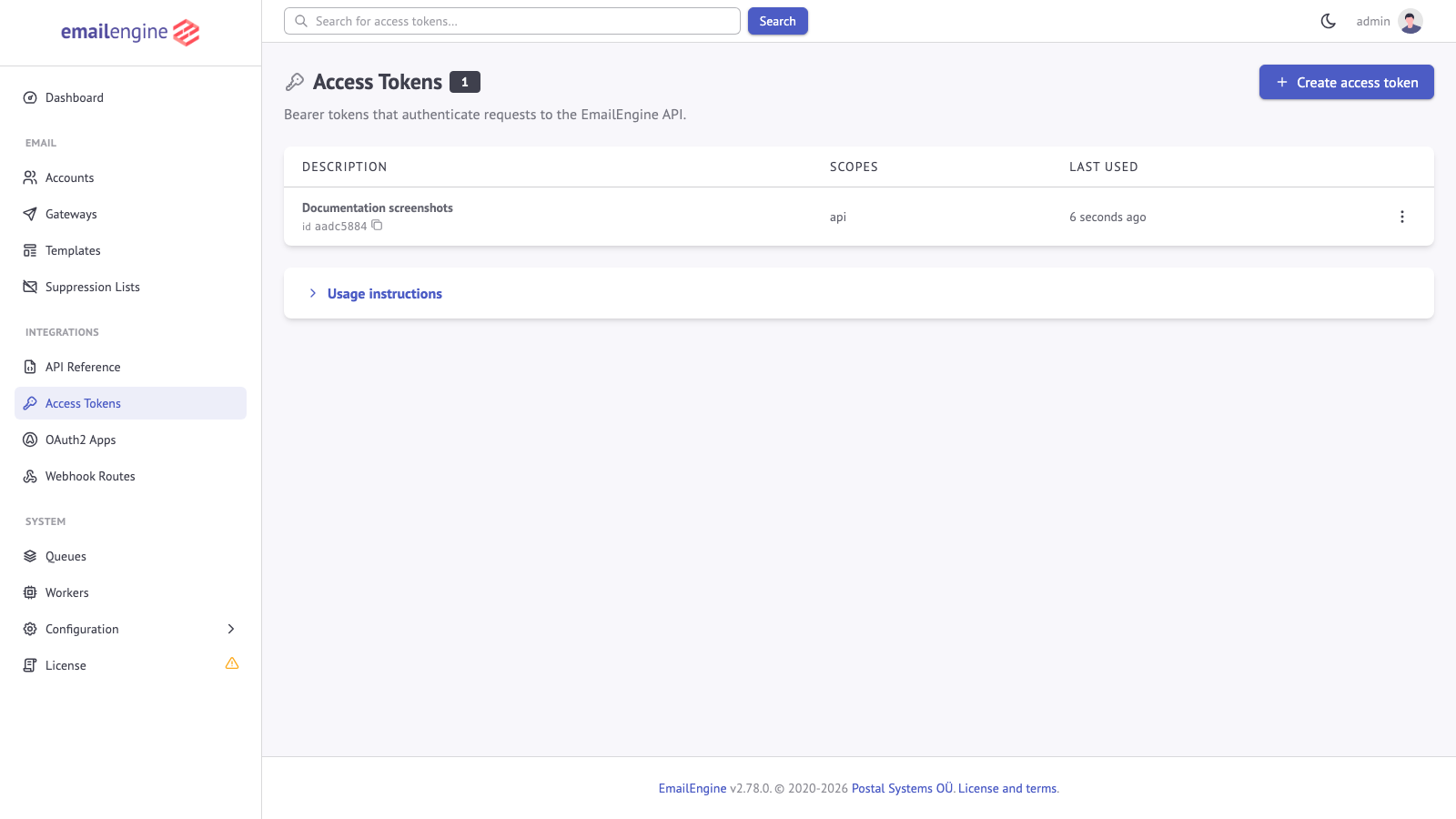 The Access Tokens page lists active tokens with their descriptions and scopes
Via API:
curl -X DELETE https://emailengine.example.com/v1/tokens/TOKEN_VALUE_OR_ID \
  -H "Authorization: Bearer ADMIN_TOKEN"
The path parameter accepts either the original token value or the token id (the SHA-256 hash shown by the token listing endpoints), so tokens can be revoked even if the original value is no longer available.
The CLI does not have a tokens delete command. To delete tokens programmatically, use the API endpoint above or the web interface.
Audit Log
EmailEngine can record what each token actually did. It is off by default: turn it on under Configuration > Security > Access Token Audit Log, after which every request a token makes is recorded, refusals included.
curl "https://emailengine.example.com/v1/tokens/TOKEN_VALUE_OR_ID/log" \
  -H "Authorization: Bearer ADMIN_TOKEN"
Each entry names the moment, the client address, the request, and what happened to it:
| Field | Meaning |
|---|---|
time | When the request arrived |
ip | The client address, resolved through the proxy configuration if there is one |
method, path | The API operation, as the route pattern: get and /v1/account/{account}/messages. For SMTP and the IMAP proxy, method is the surface name instead |
action, group | The permission the operation resolved to |
account | The account the request named, when it named one |
status | allowed or denied |
reason | Why a denied request was refused: scope, account, address, referrer or rateLimit for a token-level refusal, action, group, grant or restricted when the permissions record refused it, malformed or unclassified when the record or the route could not be read, and username or ip when the SMTP server or the IMAP proxy refused the login. null when allowed |
Retention is bounded per token by EENGINE_TOKEN_LOG_ENTRIES, 1000 by default, and EENGINE_TOKEN_LOG_AGE, seven days by default, whichever is reached first. The log lives in Redis, so both limits cost memory across every token that has one.
A denied entry is the useful half: it shows an integration reaching for something its token was never granted, which is what a narrowed token is supposed to surface.
Disabling Authentication (Development Only)
Disabling authentication removes all API access control. Use it on a local instance with test accounts, and re-enable it before the instance is reachable by anyone else.
You can disable the access token requirement for development purposes:
- Log in to EmailEngine web interface
- Navigate to Configuration > Security
- Uncheck Require API Authentication
- Click Save Changes
When disabled:
- API calls work without
Authorizationheader - No token validation is performed
- All endpoints are accessible without authentication, except
POST /v1/tokens, which refuses to mint a token for an unauthenticated caller - No access control or user tracking
Example:
# With authentication disabled
curl https://emailengine.example.com/v1/accounts
# Works without Bearer token
Use cases:
- Local development without tokens
- Quick testing and debugging
- Development environment setup
- Learning the API
Before going to production:
- Re-enable "Require API Authentication"
- Create proper access tokens
- Remove any unauthenticated API calls from your code
- Test with authentication enabled
Token Restrictions
Access tokens can be configured with security restrictions to limit their usage by IP address, HTTP referrer, and rate limits. These restrictions provide additional security layers for tokens used in different environments.
Configuration Options
Token restrictions are configured when creating a token via the API:
curl -X POST https://emailengine.example.com/v1/tokens \
  -H "Authorization: Bearer EXISTING_TOKEN" \
  -H "Content-Type: application/json" \
  -d '{
    "account": "user123",
    "description": "Restricted API token",
    "scopes": ["api"],
    "restrictions": {
      "addresses": ["192.168.1.0/24", "10.0.0.5"],
      "referrers": ["https://myapp.com/*", "*.example.org/*"],
      "rateLimit": {
        "maxRequests": 100,
        "timeWindow": 60
      }
    }
  }'
IP Address Allowlist
Restrict token usage to specific IP addresses or CIDR ranges:
{
  "restrictions": {
    "addresses": ["1.2.3.4", "5.6.7.8", "192.168.0.0/16", "10.0.0.0/8"]
  }
}
Supported formats:
- Single IPv4 addresses:
"192.168.1.100" - Single IPv6 addresses:
"2001:db8::1" - CIDR ranges:
"192.168.0.0/24","10.0.0.0/8"
Requests from IP addresses not in the allowlist are rejected with 403 Forbidden and the message Unauthorized address. The address is the one the proxy configuration resolves, so behind a reverse proxy the trusted X-Forwarded-For value is what gets matched.
HTTP Referrer Patterns
Restrict token usage based on the HTTP Referer header. This is useful for tokens used in browser-based applications:
{
  "restrictions": {
    "referrers": ["*web.domain.org/*", "*.domain.org/*", "https://domain.org/*"]
  }
}
Pattern syntax:
*matches any sequence of characters- Patterns are matched against the full referrer URL
- Multiple patterns can be specified (any match allows the request)
Use cases:
- Restrict tokens to specific web applications
- Prevent token misuse if leaked
- Enforce origin-based access control
A request whose Referer header matches none of the patterns is rejected with 403 Forbidden and the message Unauthorized referrer.
HTTP referrer restrictions can be bypassed by clients that do not send the Referer header or forge it. Use this as an additional layer of security, not as the sole protection mechanism.
Rate Limiting
Limit the number of API requests a token can make within a time window:
{
  "restrictions": {
    "rateLimit": {
      "maxRequests": 100,
      "timeWindow": 60
    }
  }
}
Parameters:
| Parameter | Type | Description |
|---|---|---|
maxRequests | integer | Maximum number of requests allowed in the time window |
timeWindow | integer | Time window duration in seconds |
Example configurations:
// 20 requests per 2 seconds (burst protection)
{ "maxRequests": 20, "timeWindow": 2 }

// 1000 requests per hour (daily limit)
{ "maxRequests": 1000, "timeWindow": 3600 }

// 100 requests per minute (standard rate limit)
{ "maxRequests": 100, "timeWindow": 60 }
When the rate limit is exceeded, requests are rejected with 429 Too Many Requests. The body carries ttl, the number of seconds until the window resets, and the response sets X-RateLimit-Limit, X-RateLimit-Reset and, since 2.79.8, Retry-After with the same number of seconds. Requests that are within the limit carry X-RateLimit-Limit and X-RateLimit-Reset plus X-RateLimit-Remaining.
{
  "statusCode": 429,
  "error": "Too Many Requests",
  "message": "Rate limit exceeded",
  "ttl": 42
}
Combining Restrictions
All restriction types can be combined. A request must satisfy ALL configured restrictions:
curl -X POST https://emailengine.example.com/v1/tokens \
  -H "Authorization: Bearer EXISTING_TOKEN" \
  -H "Content-Type: application/json" \
  -d '{
    "account": "user123",
    "description": "Fully restricted frontend token",
    "scopes": ["api"],
    "restrictions": {
      "addresses": ["203.0.113.0/24"],
      "referrers": ["https://app.example.com/*"],
      "rateLimit": {
        "maxRequests": 50,
        "timeWindow": 60
      }
    }
  }'
Disabling Restrictions
Set any restriction to false to disable it:
{
  "restrictions": {
    "addresses": false,
    "referrers": false,
    "rateLimit": false
  }
}
Or omit the restrictions object entirely to create an unrestricted token.
See Also
- Command Line Interface (CLI) - Complete CLI reference for token management and administration
- Prepared Tokens - CLI commands, export/import, and automated deployment configuration
- API Authentication - Using tokens in API requests
- Account Management API - Managing email accounts with tokens
- Security Best Practices - General security guidelines for EmailEngine deployment