EmailEngine Licensing
Complete information about EmailEngine subscription-based licensing, free trial, activation, and management.
- Free Trial: 14 days, full functionality, no limitations
- Production: Annual subscription with unlimited license keys
- Pricing: Flat annual subscription, excluding VAT - view current plans
- License Keys: Generate unlimited keys per subscription
Free Trial
Every EmailEngine instance includes a 14-day free trial with full functionality.
Trial Features:
- Unlimited accounts - No account limits
- Full API access - All endpoints available
- All email protocols - IMAP, SMTP, Gmail API, Microsoft Graph
- OAuth2 authentication - Gmail, Outlook, Microsoft 365
- Webhooks - Real-time notifications
- All features - Identical to paid subscription
- No credit card required - Start immediately
How to activate:
# Start EmailEngine without a license key
emailengine
- Access web interface:
http://localhost:3000 - Click "Start a 14-day trial" button in the dashboard
- Trial begins immediately (no sign-up required)
- Lasts for 14 days from activation
Trial period:
- Starts when you click "Start a 14-day trial" button
- Lasts 14 days from activation
- No functionality restrictions
- Full production capabilities
- No sign-up or account creation needed
After trial expires:
- At the next license check (they run every 20 minutes, and at startup) EmailEngine stops the IMAP, sending, SMTP server, webhook and IMAP proxy workers
- The API and the admin interface keep running, so a key can still be activated, and
GET /v1/licensereports"suspended": true - Accounts and their data stay in Redis
- Activating a license key restarts the workers without a restart of the process
One trial per instance:
A trial key is tied to the Redis database it was activated in. Activating a second, different trial key on the same instance is refused with Trial already activated. The key is time-limited and verified offline, so a trial instance makes no validation calls.
A trial also switches on error reporting to the Sentry instance run by the EmailEngine developers (the sentryEnabled setting) until you set that setting yourself or activate a full license. See Logging and monitoring under the environment variables for how to point it at your own Sentry or keep it off.
Best for:
- Evaluating EmailEngine
- Testing integration
- Proof of concept
- Development and prototyping
Start using EmailEngine immediately. No sign-up, no credit card, no limitations during trial period.
Production Subscription
Features:
- Unlimited accounts - No restrictions
- Unlimited EmailEngine instances - Run as many as needed
- Unlimited license keys - Generate keys for all instances
- Unlimited API calls - No rate limits beyond technical constraints
- All features included - Same as trial, no feature tiers
- Priority support - Email support with faster response
- Commercial use - Deploy in production environments
- Updates included - All updates during subscription period
- Source code access - Self-hosted deployment
Pricing:
- View current pricing and plans
- Annual subscription model
- Flat rate (not per-mailbox or per-instance)
- Payment via credit card or SEPA direct debit
VAT (Value Added Tax):
- VAT is added to all customers in Estonia
- VAT is added to EU customers without a valid VAT number
- EU business customers with a valid VAT number are exempt (reverse charge applies)
- Customers outside the EU are not charged VAT
How it works:
- Purchase a subscription (not individual licenses)
- Generate unlimited license keys for your EmailEngine instances
- All keys remain valid as long as subscription is active
- No additional costs per key, instance, account, or API call
How Subscriptions Work
Subscription vs License Keys
Important distinction:
- Subscription: Your annual plan that you pay for at https://postalsys.com/
- License Keys: Individual keys generated from your subscription for each EmailEngine instance
You buy one subscription, generate many keys.
Subscription Model
No additional costs for:
- Number of license keys
- Number of EmailEngine instances
- Number of email accounts
- Number of API calls
You only pay for the subscription.
What a Licensed Instance Sends Home
A subscription license is validated against postalsys.com at startup after an upgrade and periodically after that: the validation response sets the next check, at most 30 days out, and checks are never closer together than 24 hours. That request carries the license key, the EmailEngine version, a stable instance ID, and an anonymized feature beacon: which features are on, coarse magnitude tiers rather than exact counts, the mail providers in use, and runtime facts such as the Node.js version. It never carries email content, addresses, URLs, or credentials.
Set EENGINE_BEACON_DISABLED=true to drop the beacon from the request while keeping validation. A perpetual license, a trial key and any other time-limited key are verified offline and make no request at all.
If the validation service reports the subscription as invalid, the instance keeps running on the stored key for 28 days and rechecks hourly. Only when that window passes without a successful validation is the key removed and the workers suspended, exactly as after a trial expires. A network failure during validation is logged and retried; it never suspends anything.
See Compliance and data handling for the full outbound picture, including the optional features that reach other services.
Getting Started
Step 1: Try for Free
- Download and install EmailEngine
- Start EmailEngine without license key
- Access web interface at
http://localhost:3000 - Click "Start a 14-day trial" button in the dashboard
- 14-day trial begins immediately
- Full functionality, no limitations
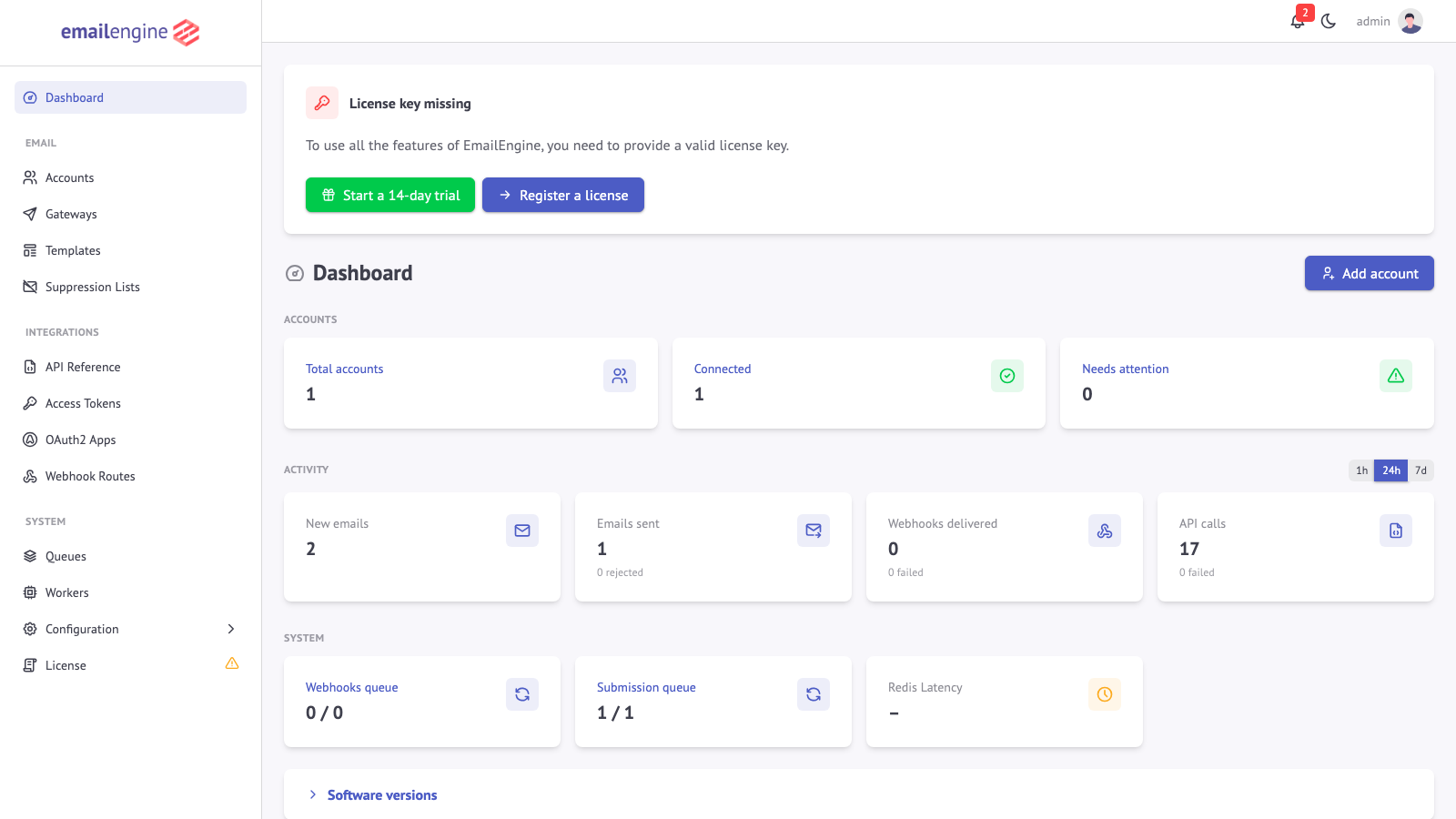 A fresh, unlicensed installation shows the "Start a 14-day trial" button at the top of the dashboard
Step 2: Create Account (When Ready to Purchase)
- Visit https://postalsys.com/
- Click "Sign Up"
- Provide email and password
Step 3: Add Billing Information
- Log in to your account at https://postalsys.com/
- Navigate to Billing section: https://postalsys.com/billing/info
- Add billing details:
- Company name (required)
- Billing address
- Tax information (if applicable)
- Add payment method:
- Credit card, or
- SEPA direct debit
Step 4: Subscribe to Plan
- Go to https://postalsys.com/plans
- Review available plans and pricing
- Select the plan that fits your needs
- Click "Subscribe"
- Confirm payment
Upon successful payment:
- Subscription is activated immediately
- "License Keys" section becomes available in your account
- You can now generate license keys
Step 5: Generate License Keys
- Log in to https://postalsys.com/
- Navigate to License Keys section: https://postalsys.com/licenses
- Click "Generate New License Key"
- Optionally add a label (e.g., "Production Server", "Staging")
- Copy the generated license key
You can generate as many license keys as you need at no additional cost.
Step 6: Activate License in EmailEngine
Option 1: Web Dashboard (Recommended)
- Access web interface:
http://localhost:3000 - Navigate to License page:
http://localhost:3000/admin/config/license - Paste the license key into the text field (or use Upload license file)
- Click Activate license
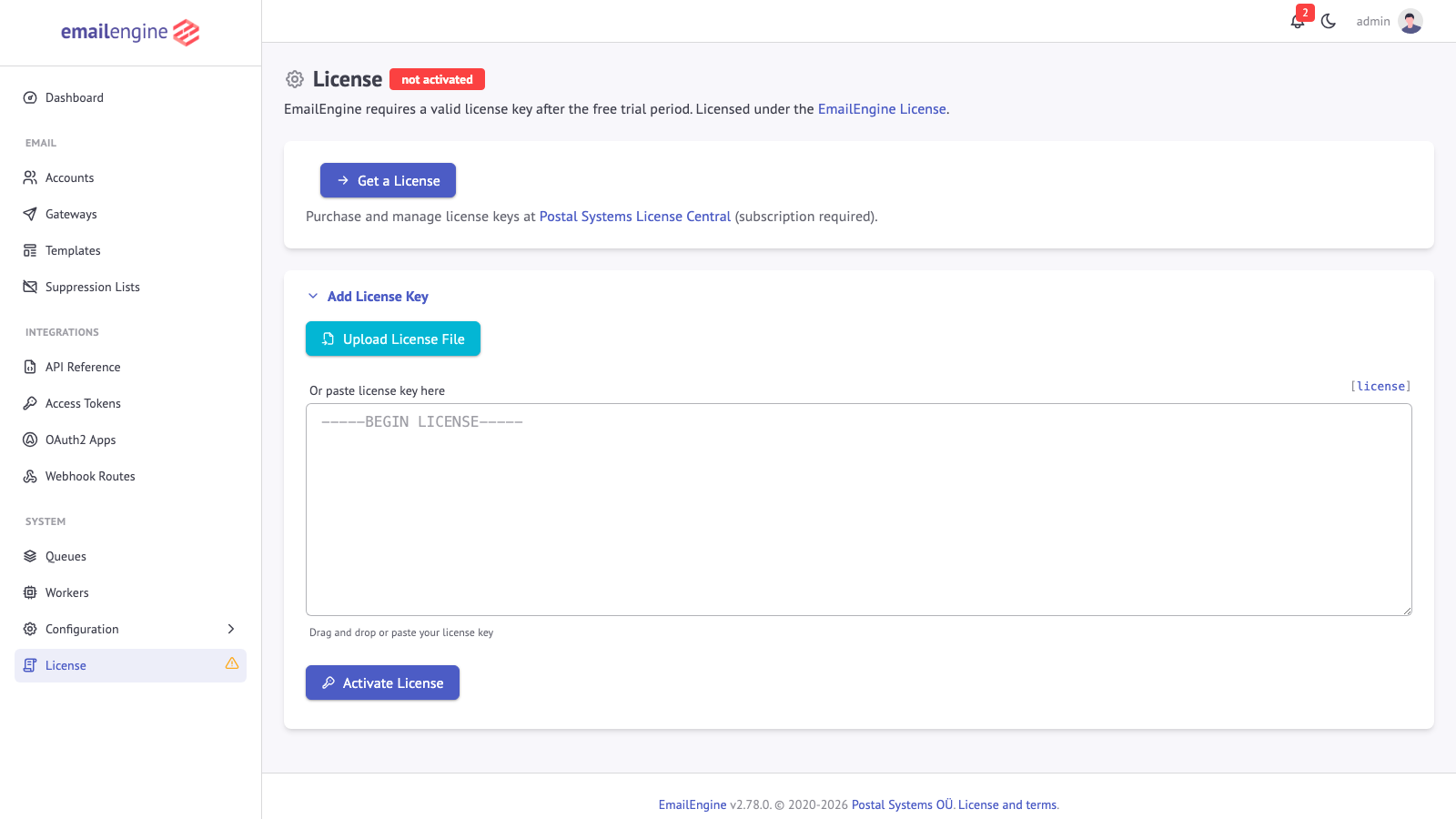 The License page accepts an uploaded license file or a pasted license key
This is the easiest method for manual activation.
Option 2: Environment Variable
For automated deployments and containerized environments, put the key in EENGINE_PREPARED_LICENSE and EmailEngine imports it at startup:
export EENGINE_PREPARED_LICENSE="-----BEGIN LICENSE-----
Application: EmailEngine
Licensed to: Your Company Name

eyJhbGciOiJIUzI1NiIsInR5cCI6IkpXVCJ9abcdefghijklmnopqrstuvwxyz
-----END LICENSE-----"

emailengine
The same value works as the --preparedLicense command-line argument and as preparedLicense in a config file, and the single-line form printed by emailengine license export is accepted too. Prepared license has the SystemD, Docker and Docker Compose variants and the format details.
Option 3: API
POST /v1/license registers a key on a running instance, which is what a provisioning script uses after the process is already up. The earlier steps address an instance you have just installed on your own machine, so they use localhost; this one addresses a deployment, so it uses the deployment's address:
curl -X POST "https://emailengine.example.com/v1/license" \
  -H "Authorization: Bearer YOUR_ACCESS_TOKEN" \
  -H "Content-Type: application/json" \
  -d '{
    "license": "-----BEGIN LICENSE-----\nApplication: EmailEngine\nLicensed to: Your Company Name\n\neyJhbGciOiJIUzI1NiIsInR5cCI6IkpXVCJ9abcdefghijklmnopqrstuvwxyz\n-----END LICENSE-----"
  }'
The response is the same object GET /v1/license returns:
{
  "active": true,
  "type": "EmailEngine License",
  "details": {
    "application": "@postalsys/emailengine-app",
    "key": "1edf01e35e75ed3425808eba",
    "licensedTo": "Your Company Name",
    "hostname": "emailengine.example.com",
    "created": "2026-01-13T07:47:42.695Z",
    "trial": false,
    "lt": false
  }
}
details is false on an unlicensed instance, details.expires is present only for time-limited keys such as a trial, lt marks a lifetime license, and suspended: true appears while the workers are stopped for want of a license. DELETE /v1/license removes the key and the instance drops back to the unlicensed state described above. All three endpoints need an instance-wide token, not one bound to an account. A token narrowed with a permissions record reaches them only when the record names the license group; before v2.80.1 license management sat in the never-grantable admin group, out of reach of every narrowed token. See the License API.
Managing Your Subscription
Inviting Team Members
You can invite teammates to help manage license keys and billing:
- Log in to https://postalsys.com/
- Navigate to Manage Team
- Click "Invite Member"
- Enter their email address
Annual Renewal
Automatic Renewal (Default):
- 7 days before expiration: Renewal reminder email sent
- On renewal date: Subscription automatically renews
- Payment: Credit card or SEPA direct debit charged automatically
- License keys: All existing keys remain valid
- No action needed if auto-renewal succeeds
What happens on successful renewal:
- Subscription extended for another year
- All license keys remain active
- No interruption to EmailEngine instances
- Invoice generated and emailed
Failed Renewal
If automatic renewal fails (expired card, insufficient funds, etc.):
-
Immediate notification:
- Email sent to billing email address
-
Invoice generated:
- Payment due within 30 days
- Late payment grace period
-
View invoice:
- Log in to https://postalsys.com/
- Warning banner displayed with link to invoice
-
During 30-day grace period:
- All license keys remain valid
- EmailEngine continues working normally
- No interruption to service
- Warning shown in account dashboard
-
Pay the invoice:
- Payment must be made on the invoice page via credit card or SEPA direct debit
- Update payment method if needed
- Complete payment online
-
After payment:
- Subscription status restored to active
- New expiration date = original date + 1 year
- All license keys remain active
- No disruption
Grace Period Expiration
If invoice remains unpaid after 30 days:
- Subscription canceled automatically
- All license keys revoked
- EmailEngine instances:
- Stop syncing, sending and delivering webhooks once the key fails validation and the 28-day window has passed
- The API and the admin interface keep answering
- All accounts and data remain in Redis
To restore service:
- Subscribe to a new plan at https://postalsys.com/plans
- Generate new license keys
- Update EmailEngine instances with new keys
- Service restored immediately
- All accounts and data preserved
Voluntary Subscription Cancellation
If you cancel your subscription voluntarily:
-
Subscription remains active until renewal date
- No immediate service interruption
- All license keys remain valid
- EmailEngine continues working normally
-
On original renewal date:
- Subscription expires
- All license keys revoked
- EmailEngine instances stop syncing and sending after the 28-day window
- All data preserved in Redis
-
To continue service:
- Resubscribe before expiration date
- Or subscribe after expiration to restore access
- Generate new license keys after resubscribing
- Update EmailEngine instances with new keys
Example timeline:
Jan 1, 2025:  Subscribe (expires Jan 1, 2026)
Nov 15, 2025: Cancel subscription voluntarily
              → Service continues normally
              → License keys still valid
Jan 1, 2026:  Subscription expires (original renewal date)
              → License keys revoked
              → EmailEngine instances stop syncing and sending after the 28-day window
FAQ
General Questions
Q: How long is the free trial?
A: 14 days from when you click the "Start a 14-day trial" button. Full functionality, no limitations, no credit card required.
Q: What happens when trial expires?
A: The IMAP, sending, SMTP server, webhook and IMAP proxy workers are stopped at the next license check; the API and the admin interface stay up and all data is preserved. Activate a license key to restart the workers.
Q: Can I extend the trial?
A: Trial is fixed at 14 days. Contact support@postalsys.com if you need more evaluation time.
Q: Do I need separate subscriptions for dev/staging/production?
A: No. One subscription covers all environments. Generate separate license keys for each environment from the same subscription. Or use free trial for testing/development.
Q: Can I share my subscription with others?
A: If you're part of the same organization, yes. Invite them as team members. Each team member can manage license keys. Do not share subscriptions across different companies.
Q: What happens if I cancel my subscription?
A: Your subscription remains active until the original renewal date. All license keys continue working normally until that date. On the renewal date, the subscription expires and all license keys are revoked. You can resubscribe anytime to restore service.
Q: Do you offer refunds?
A: No refunds are offered. Please use the 14-day free trial to fully evaluate EmailEngine before subscribing. The trial includes all features with no limitations, allowing you to thoroughly test the service for your use case.
Business Questions
Q: Can I resell EmailEngine as part of my SaaS?
A: Yes, with active subscription. Your customers don't need individual subscriptions. You deploy EmailEngine with your license keys on your infrastructure.
Example: You build a CRM with email. You subscribe to EmailEngine. Your 1,000 customers use your CRM. You only need one subscription.
Q: Do I need to buy separate subscriptions for each customer?
A: No. One subscription covers all your deployments, regardless of how many customers you serve.
Q: Can I pay via invoice/PO?
A: Invoice payment is not available for regular self-service plans. All regular plan payments must be made online via credit card or SEPA direct debit.
However, custom plans are available with invoice payment options. Custom plans are more expensive than regular plans but offer additional flexibility such as:
- Invoice/PO payment
- Lifetime subscriptions
- Custom terms and pricing
- Enterprise agreements
Contact support@postalsys.com for custom plan details and pricing.
Note: If automatic renewal fails on a regular plan, an invoice is generated for the grace period, but payment must still be completed online using credit card or SEPA direct debit.
Q: What currency is pricing in?
A: EU customers are billed in euros, customers elsewhere in US dollars. See https://postalsys.com/plans for the price in your currency. Credit card payments auto-convert.
See Also
- Support - Support channels and what a subscription covers
- Compliance and data handling - Everything an instance sends out
- Prepared license - Activating a key without touching the interface
- CLI reference - Importing and exporting keys from the command line
- License API - Reading, registering and removing a key over the API