Webhook Routes
Webhook routing allows you to define custom conditions that route specific webhook events to different target endpoints. Instead of sending all webhooks to a single global URL, you can create multiple routes with JavaScript filter functions that determine which events should be forwarded to which destinations.
Overview
What are Webhook Routes?
EmailEngine's webhook routing system enables you to:
- Route by Account: Send webhooks for specific accounts to dedicated endpoints
- Route by Event Type: Forward only certain event types (e.g.,
messageNew) to specific handlers - Route by Content: Use JavaScript filter functions to inspect the payload and decide whether to forward
- Transform Payloads: Use mapping functions to transform the webhook payload before delivery
- Multiple Destinations: Send the same event to multiple endpoints if multiple route filters match
When to Use Webhook Routes
Multi-tenant Applications
Route webhooks for different customer accounts to separate endpoints:
// Filter: Route all webhooks for customer "acme-corp" to their dedicated endpoint
if (payload.account === 'acme-corp') {
    return true;
}
Event-Specific Processing
Send different event types to specialized handlers:
// Filter: Only forward bounce notifications
if (payload.event === 'messageBounce') {
    return true;
}
Reducing Webhook Volume
Filter out events you don't need to process:
// Filter: Only forward new messages in INBOX
const isInbox = payload.path === 'INBOX' || payload.data?.labels?.includes('\\Inbox');
if (payload.event === 'messageNew' && isInbox) {
    return true;
}
Third-Party Integrations
Transform webhooks to match the expected format of external services like Slack, Discord, or Zapier:
// Map: Transform to Slack incoming webhook format
return {
    text: `New email from ${payload.data?.from?.address}`,
    blocks: [
        {
            type: 'section',
            text: {
                type: 'mrkdwn',
                text: `*Subject:* ${payload.data?.subject}`
            }
        }
    ]
};
How Routing Works
Route Processing Order
When EmailEngine generates a webhook event:
- Filter evaluation: every enabled route with a target URL and a compiled filter function runs its filter against the payload
- Matching routes: each route whose filter returns a truthy value gets its own delivery
- Payload transformation: a route with a map function delivers what the map returns instead of the original payload
- Default delivery: independently of all of that, the event is also delivered to the account's own webhook URL if it has one, otherwise to the global webhook URL
A route needs all three of an enabled flag, a target URL and a filter function. A route without a filter function never fires, even when it is enabled and has a URL, and the account page's routing card flags such a route rather than listing it as delivering.
The webhookEvents allowlist governs the default delivery only. Routes decide for themselves in their filter, so a route can deliver an event the allowlist excludes, and inboxNewOnly likewise does not apply to routes.
Filter Function
The filter function determines whether a webhook should be sent to this route's target URL. It receives the complete webhook payload as a global variable.
Requirements:
- Return a truthy value to forward the webhook
- Return
false,null,undefined, or any other falsy value to skip it - The payload is available as the
payloadvariable - A function that throws is treated as "do not send". The error and the payload are written to the route's Error log tab
- Mutating
payloadhas no effect on what is delivered. The function receives a copy
Example Filter Functions:
// Forward all webhooks (default behavior)
return true;

// Forward only for specific account
if (payload.account === 'my-account-id') {
    return true;
}

// Forward only new messages
if (payload.event === 'messageNew') {
    return true;
}

// Forward messages from specific sender
if (payload.event === 'messageNew' &&
    payload.data?.from?.address?.endsWith('@important-domain.com')) {
    return true;
}

// Forward messages with specific subject pattern
if (payload.event === 'messageNew' &&
    /urgent|critical/i.test(payload.data?.subject || '')) {
    return true;
}
Mapping Function
The mapping function transforms the webhook payload before delivery. This is useful when integrating with third-party services that expect a specific payload format.
Requirements:
- Return the object to send. It becomes the entire request body, replacing the standard payload
- The payload is available as the
payloadvariable - Leave the map function empty to send the standard payload unchanged
- A function that throws sends the standard payload instead. The error and the payload are written to the route's Error log tab
- A mapped body carries no event ID unless the function puts one there, so the
X-EE-Wh-Event-Idheader is absent for such a delivery and deduplication has to use something the mapped body carries - A map function with a syntax error takes the whole route down, filter included, until it is fixed
Example Mapping Functions:
// Add a timestamp to a copy of the standard payload
return Object.assign({}, payload, { timestamp: Date.now() });

// Transform to Slack format
return {
    text: `New email received`,
    blocks: [
        {
            type: 'section',
            text: {
                type: 'mrkdwn',
                text: `*From:* ${payload.data?.from?.address}\n*Subject:* ${payload.data?.subject}`
            }
        }
    ]
};

// Transform to Discord webhook format
return {
    content: `New email from ${payload.data?.from?.name || payload.data?.from?.address}`,
    embeds: [
        {
            title: payload.data?.subject,
            description: payload.data?.text?.plain?.substring(0, 200) || '',
            color: 5814783
        }
    ]
};

// Simplify payload for processing
return {
    event: payload.event,
    account: payload.account,
    messageId: payload.data?.id,
    from: payload.data?.from?.address,
    subject: payload.data?.subject,
    receivedAt: payload.date
};
Disabling the Default Webhook
When using webhook routing, you may want to disable the default global webhook to avoid receiving duplicate events. The default webhook is configured in the main webhook settings and receives all events (based on the event filter).
Understanding Webhook Hierarchy
EmailEngine processes webhooks in two parallel tracks:
Track 1: Webhook Routes (Independent)
Custom webhook routes are always evaluated first and independently. If a route's filter function returns true, the webhook is sent to that route's target URL. Multiple routes can match the same event, each receiving their own copy.
Track 2: Default Webhook Delivery (Fallback Chain)
The event is also delivered to a default destination, provided webhookEvents names it. The destination is resolved in this order:
- Account-specific webhook URL - if the account has one, the webhook goes there
- Global webhook URL - otherwise the global URL is used
If neither is set, nothing is sent on this track and the queue job still reports as completed.
Each account can have its own dedicated webhook URL configured in the account settings. When set, this URL replaces the global webhook URL for that account - webhooks are sent to the account URL, not the global URL. This is useful for multi-tenant setups where each customer's account needs to send webhooks to their own endpoint.
Webhook routes are not affected by account-specific webhook URLs. Routes are evaluated independently and will still receive webhooks based on their filter functions, regardless of whether an account has a dedicated URL set.
To use only routed webhooks (disable both account and global default webhooks):
- Leave the global webhook URL empty, AND
- Do not set account-specific webhook URLs
To use only account-specific webhooks (no global fallback):
- Leave the global webhook URL empty
- Set webhook URLs on individual accounts as needed
Via Web UI
- Navigate to Configuration in the sidebar
- Click Webhooks
- Leave the Webhook URL field empty
- Keep Enable Webhooks checked, since it gates routes as well
- Click Save Changes
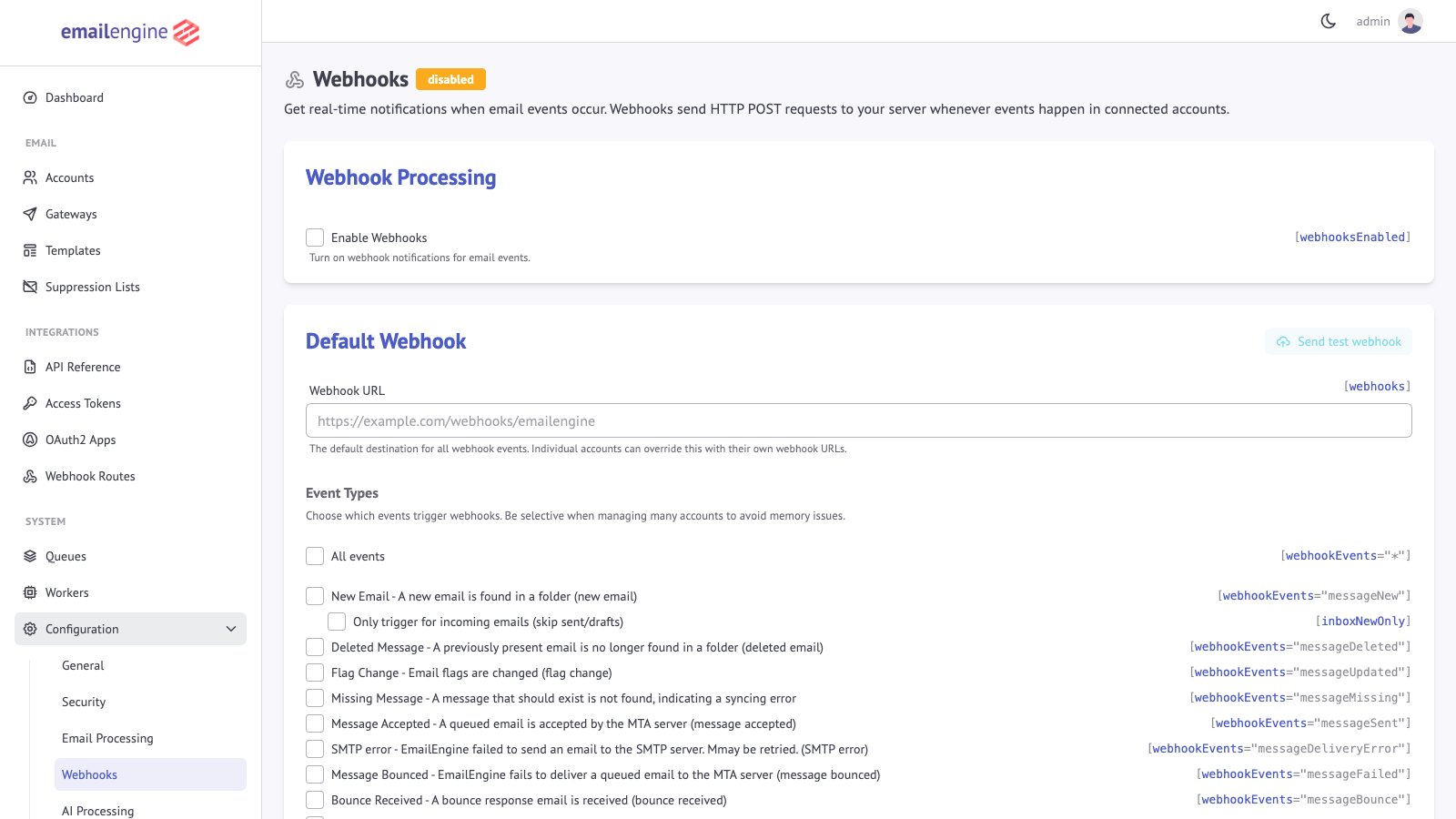
The Enable Webhooks toggle must remain enabled for webhook routing to work. This setting controls the entire webhook system, including custom routes. Only clear the webhook URL field if you want to disable the default destination while keeping routes active.
Via API
Use the settings API to clear the default webhook URL:
- cURL
- Node.js
- Python
- PHP
curl -X POST "https://emailengine.example.com/v1/settings" \
  -H "Authorization: Bearer YOUR_ACCESS_TOKEN" \
  -H "Content-Type: application/json" \
  -d '{
    "webhooks": "",
    "webhooksEnabled": true
  }'
const response = await fetch('https://emailengine.example.com/v1/settings', {
    method: 'POST',
    headers: {
        'Authorization': 'Bearer YOUR_ACCESS_TOKEN',
        'Content-Type': 'application/json'
    },
    body: JSON.stringify({
        webhooks: '',           // Empty string to disable default webhook
        webhooksEnabled: true   // Keep routing enabled
    })
});

const result = await response.json();
console.log('Settings updated:', result.success);
import requests

response = requests.post(
    'https://emailengine.example.com/v1/settings',
    headers={
        'Authorization': 'Bearer YOUR_ACCESS_TOKEN',
        'Content-Type': 'application/json'
    },
    json={
        'webhooks': '',           # Empty string to disable default webhook
        'webhooksEnabled': True   # Keep routing enabled
    }
)

result = response.json()
print(f"Settings updated: {result['success']}")
<?php
$ch = curl_init('https://emailengine.example.com/v1/settings');

curl_setopt_array($ch, [
    CURLOPT_POST => true,
    CURLOPT_RETURNTRANSFER => true,
    CURLOPT_HTTPHEADER => [
        'Authorization: Bearer YOUR_ACCESS_TOKEN',
        'Content-Type: application/json'
    ],
    CURLOPT_POSTFIELDS => json_encode([
        'webhooks' => '',         // Empty string to disable default webhook
        'webhooksEnabled' => true // Keep routing enabled
    ])
]);

$response = curl_exec($ch);
$result = json_decode($response, true);
echo "Settings updated: " . ($result['success'] ? 'true' : 'false');
?>
Setting Account-Specific Webhook URLs
To set a dedicated webhook URL for a specific account, use the Update Account API:
- cURL
- Node.js
- Python
curl -X PUT "https://emailengine.example.com/v1/account/my-account-id" \
  -H "Authorization: Bearer YOUR_ACCESS_TOKEN" \
  -H "Content-Type: application/json" \
  -d '{
    "webhooks": "https://customer-a.example.com/webhooks"
  }'
const accountId = 'my-account-id';
const response = await fetch(`https://emailengine.example.com/v1/account/${accountId}`, {
    method: 'PUT',
    headers: {
        'Authorization': 'Bearer YOUR_ACCESS_TOKEN',
        'Content-Type': 'application/json'
    },
    body: JSON.stringify({
        webhooks: 'https://customer-a.example.com/webhooks'
    })
});

const result = await response.json();
console.log('Account updated:', result.account);
import requests

account_id = 'my-account-id'
response = requests.put(
    f'https://emailengine.example.com/v1/account/{account_id}',
    headers={
        'Authorization': 'Bearer YOUR_ACCESS_TOKEN',
        'Content-Type': 'application/json'
    },
    json={
        'webhooks': 'https://customer-a.example.com/webhooks'
    }
)

result = response.json()
print(f"Account updated: {result['account']}")
To clear an account-specific webhook URL (falling back to global webhook), set webhooks to an empty string:
curl -X PUT "https://emailengine.example.com/v1/account/my-account-id" \
  -H "Authorization: Bearer YOUR_ACCESS_TOKEN" \
  -H "Content-Type: application/json" \
  -d '{"webhooks": ""}'
Setting Up Routes via Web UI
Creating a New Route
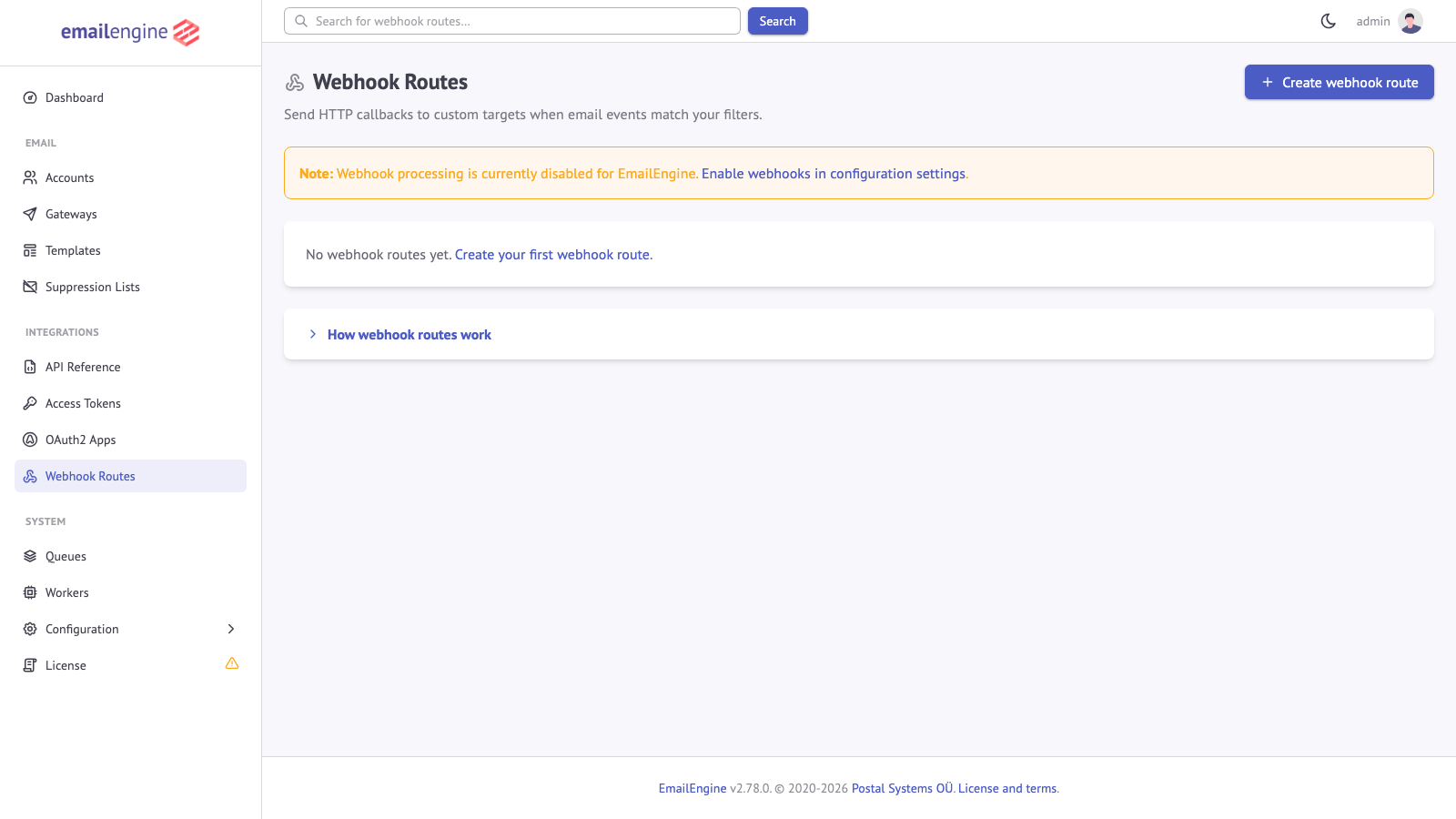
- Navigate to Webhook Routes in the sidebar (under Integrations)
-
Click Create webhook route to open the route creation form
-
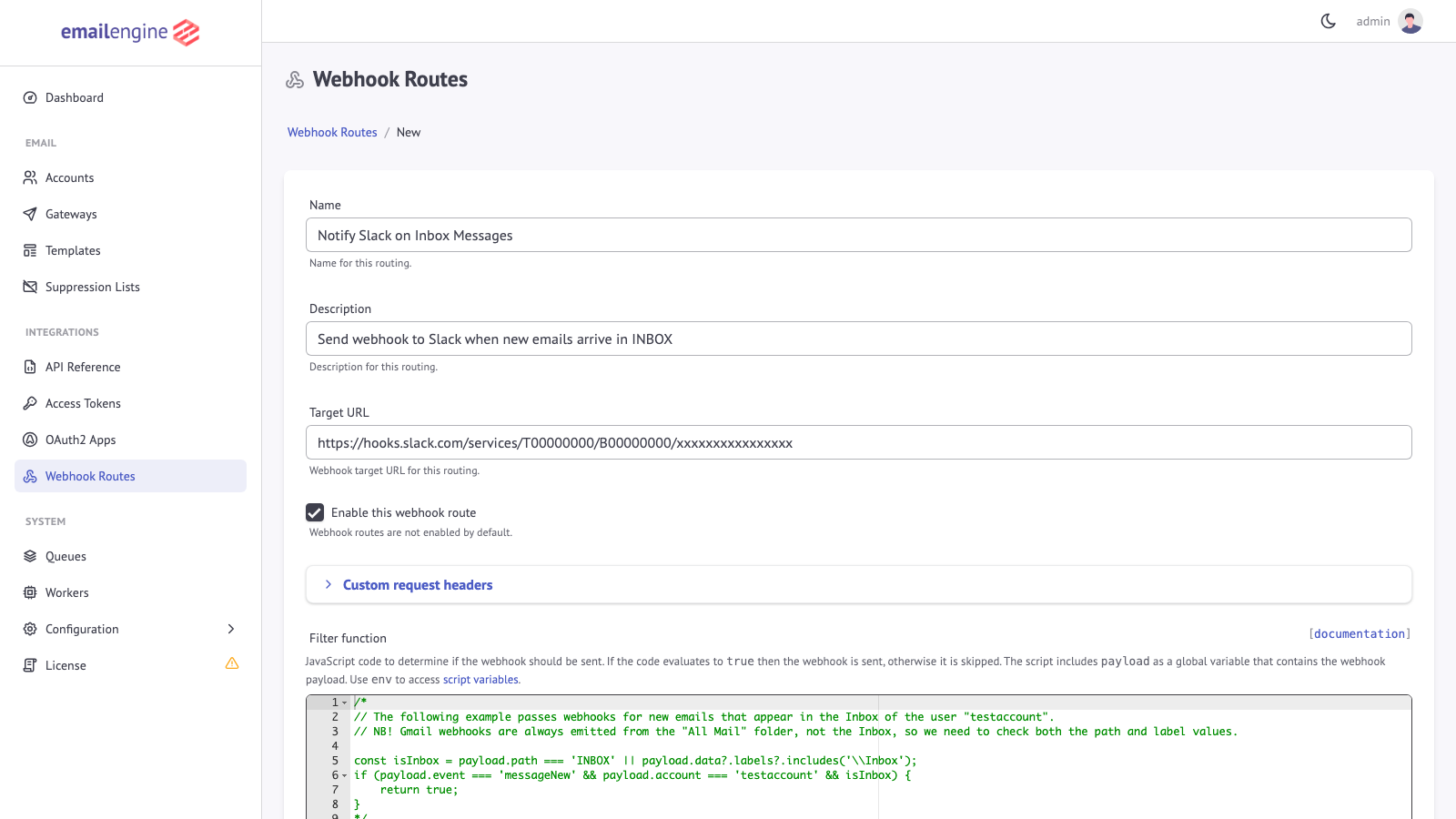
Fill in the route details:
- Name: A descriptive name for the route (e.g., "Notify Slack on Inbox Messages")
- Description: Optional description of what this route does
- Target URL: The webhook endpoint URL that will receive matching events
- Enable this webhook route: Check to activate the route
-
Configure the Filter Function:
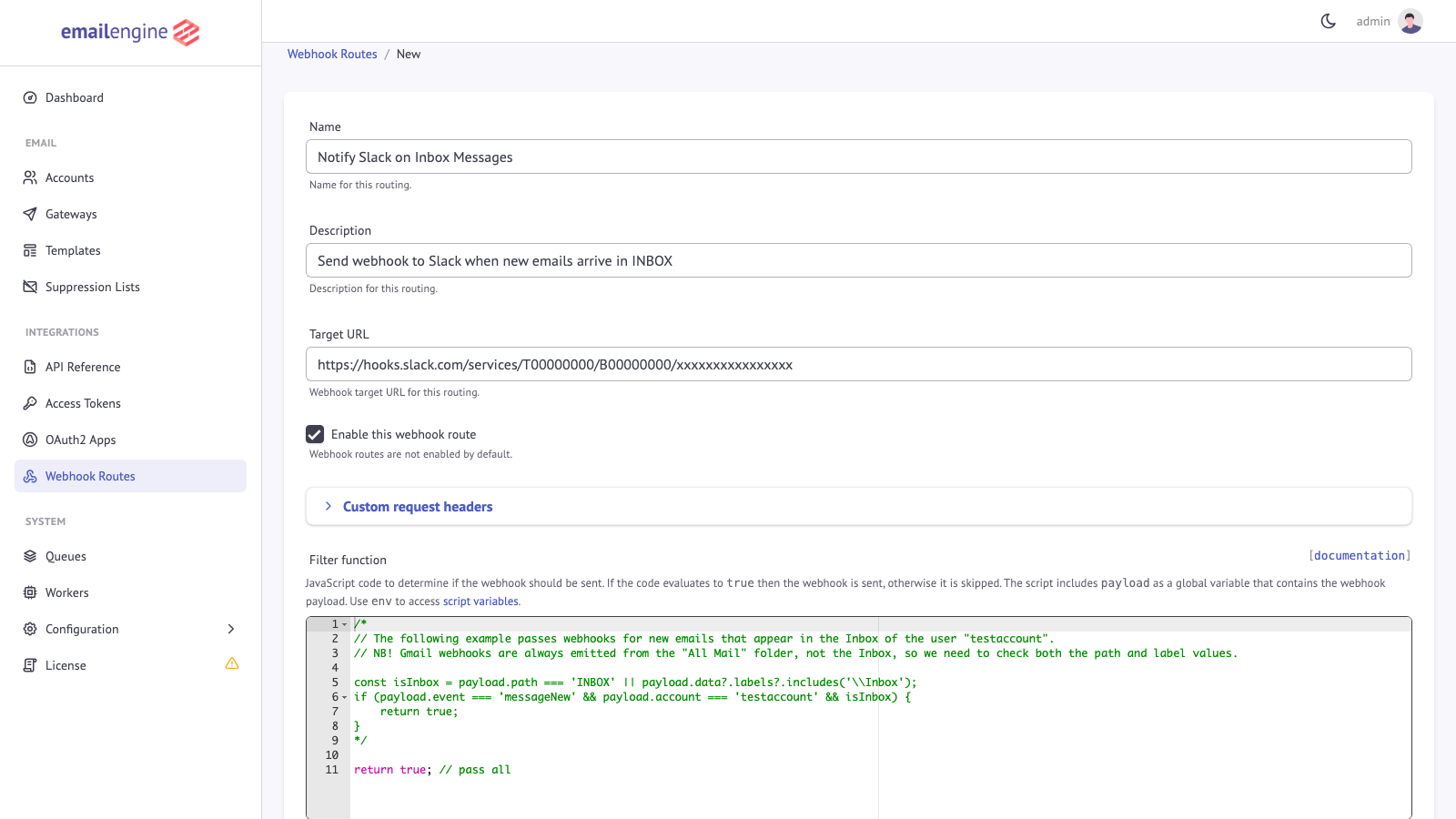
The filter function determines which webhooks are forwarded to this route. Write JavaScript code that returns
trueto send the webhook orfalseto skip it.// Example: Only forward new messages in INBOX
const isInbox = payload.path === 'INBOX' || payload.data?.labels?.includes('\\Inbox');
if (payload.event === 'messageNew' && isInbox) {
return true;
}
-
Configure the Map Function (optional):
The mapping function replaces the request body with whatever it returns. Leave it empty to send the standard payload unchanged.
-
Click Create routing to save the route
Viewing Route Details
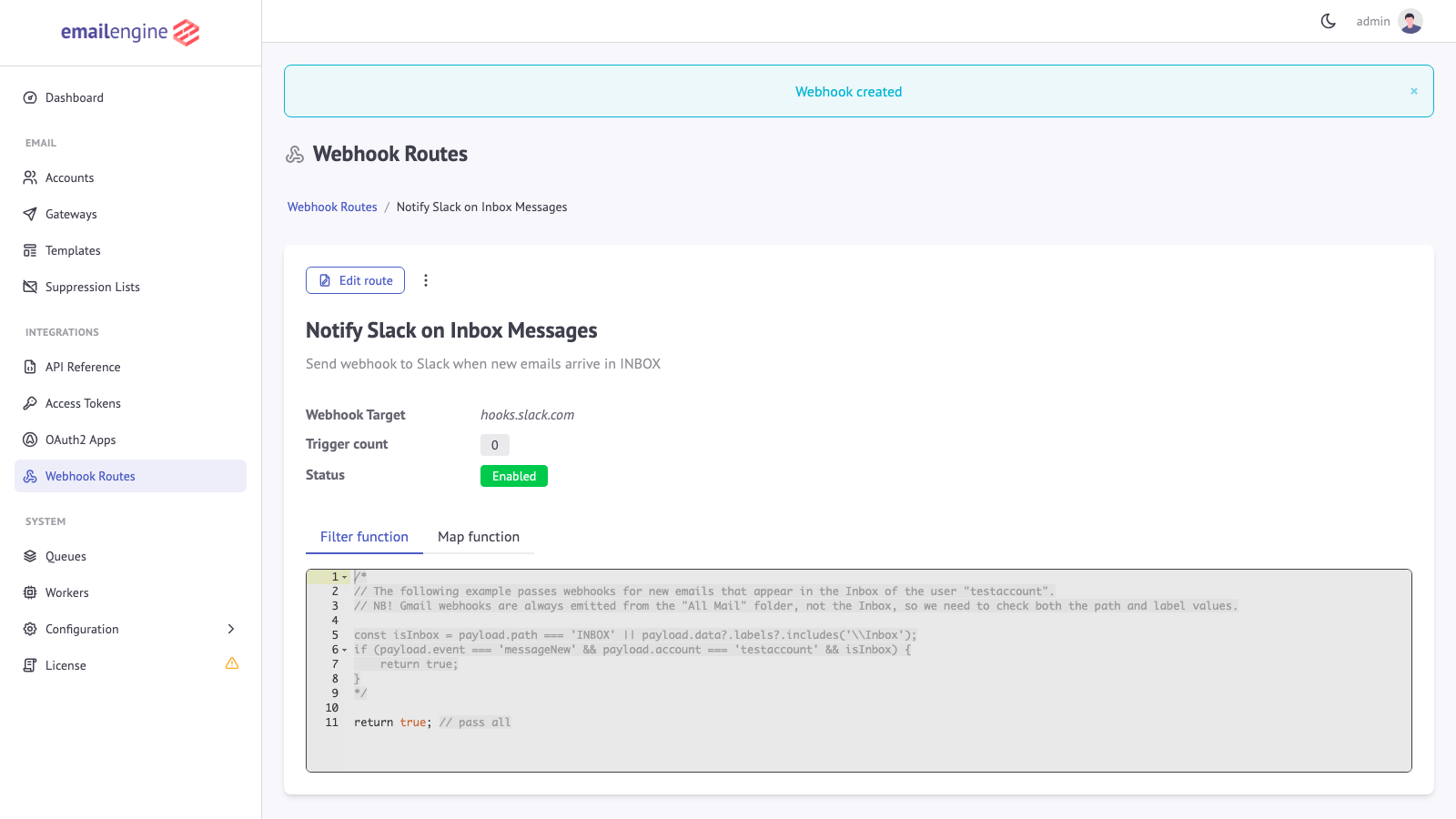
After creating a route, you can view its details including:
- Trigger count (how many times the route has been activated)
- Current status (Enabled/Disabled)
- Filter and mapping function code
- Error log (if any errors occurred during function execution)
Editing a Route
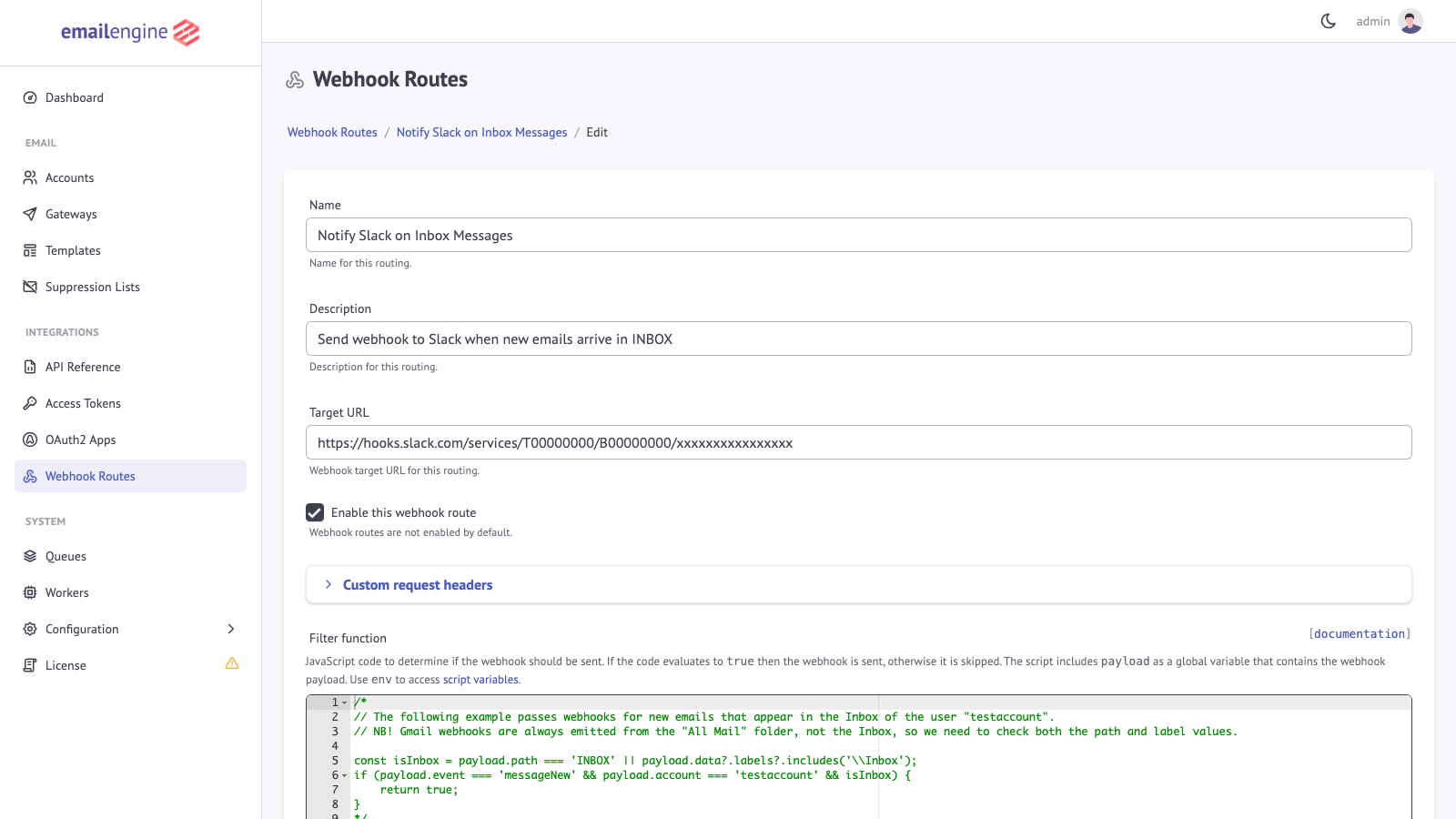
- Click on a route in the list to view its details
- Click Edit to modify the route configuration
- Make your changes and click Update webhook
Managing Custom Headers
You can add custom HTTP headers to webhook requests for authentication or identification:
-
In the route form, expand Custom request headers
-
Add headers in
Key: Valueformat, one per line:Authorization: Bearer your-secret-token
X-Custom-Header: custom-valueA route's header list replaces the global
webhooksCustomHeadersfor its own deliveries rather than adding to it. Headers set on the account are applied on top of either, so an account header of the same name wins.
Deleting a Route
- Navigate to the route detail page
- Click Delete
- Confirm the deletion in the modal dialog
Deleting a route is permanent and cannot be undone. Any webhooks that would have matched this route will no longer be delivered to its target URL.
Viewing Routes via API
You can retrieve webhook route information programmatically using the EmailEngine API:
- List routes -
GET /v1/webhookRoutes- Retrieve all configured webhook routes - Get route details -
GET /v1/webhookRoutes/webhookRoute/{webhookRoute}- Get a specific route with filter and mapping functions
Creating, updating, and deleting webhook routes is only available through the Web UI. The API provides read-only access to route information.
Practical Examples
Example 1: Route to Slack
Send new email notifications to a Slack channel with a formatted message.
Filter Function:
// Only forward new messages in INBOX
const isInbox = payload.path === 'INBOX' || payload.data?.labels?.includes('\\Inbox');
if (payload.event === 'messageNew' && isInbox) {
    return true;
}
Map Function:
// Format for Slack incoming webhook
return {
    text: `New email in ${payload.account}`,
    blocks: [
        {
            type: 'header',
            text: {
                type: 'plain_text',
                text: 'New Email Received'
            }
        },
        {
            type: 'section',
            fields: [
                {
                    type: 'mrkdwn',
                    text: `*From:*\n${payload.data?.from?.name || ''} <${payload.data?.from?.address}>`
                },
                {
                    type: 'mrkdwn',
                    text: `*Subject:*\n${payload.data?.subject || '(no subject)'}`
                }
            ]
        },
        {
            type: 'context',
            elements: [
                {
                    type: 'mrkdwn',
                    text: `Account: ${payload.account} | Received: ${new Date(payload.date).toLocaleString()}`
                }
            ]
        }
    ]
};
Example 2: Route by Account for Multi-Tenant
Route webhooks for different customer accounts to their dedicated endpoints.
Route 1 - Customer A:
// Filter: Only Customer A's accounts
if (payload.account.startsWith('customer-a-')) {
    return true;
}
Route 2 - Customer B:
// Filter: Only Customer B's accounts
if (payload.account.startsWith('customer-b-')) {
    return true;
}
Example 3: Bounce Notification Handler
Route bounce notifications to a dedicated analytics service.
Filter Function:
// Forward bounce and complaint notifications
if (payload.event === 'messageBounce' || payload.event === 'messageComplaint') {
    return true;
}
Map Function:
// Simplify payload for bounce analytics. messageBounce and messageComplaint
// carry different fields, so read each from where it actually lives.
return {
    type: payload.event,
    account: payload.account,
    originalMessageId: payload.data?.messageId || payload.data?.headers?.messageId,
    recipient: payload.data?.recipient || payload.data?.arf?.originalRcptTo?.[0],
    action: payload.data?.action,
    status: payload.data?.response?.status,
    category: payload.data?.response?.category,
    errorMessage: payload.data?.response?.message,
    timestamp: payload.date
};
Example 4: High-Priority Message Alert
Send immediate alerts for emails matching urgent criteria.
Filter Function:
// Check for high-priority messages
if (payload.event !== 'messageNew') {
    return false;
}

const subject = (payload.data?.subject || '').toLowerCase();
const from = payload.data?.from?.address || '';

// Check priority indicators
const isUrgent = /urgent|critical|emergency|asap/i.test(subject);
const isVIP = ['ceo@company.com', 'cfo@company.com'].includes(from);
const hasHighPriority = payload.data?.headers?.['x-priority'] === '1';

if (isUrgent || isVIP || hasHighPriority) {
    return true;
}
Map Function:
// Format for alerting service
return {
    alertType: 'high-priority-email',
    account: payload.account,
    from: payload.data?.from?.address,
    subject: payload.data?.subject,
    preview: (payload.data?.text?.plain || '').substring(0, 200),
    messageId: payload.data?.id,
    receivedAt: payload.date
};
Example 5: Filter by Sender Domain
Only forward webhooks from specific sender domains.
Filter Function:
// Forward only messages from trusted domains
const trustedDomains = ['partner.com', 'supplier.com', 'client.com'];

if (payload.event === 'messageNew') {
    const senderAddress = payload.data?.from?.address || '';
    const senderDomain = senderAddress.split('@')[1];

    if (trustedDomains.includes(senderDomain)) {
        return true;
    }
}
Available Variables in Functions
The payload Object
The payload variable holds the same document the default webhook would receive, plus one extra field. Its shape depends on the event, but every event carries:
| Field | Type | Description |
|---|---|---|
event | string | Event type, for example messageNew or messageSent |
account | string | Account identifier |
date | string | ISO 8601 timestamp of the event |
serviceUrl | string or null | The configured serviceUrl |
eventId | string | The value that becomes the X-EE-Wh-Event-Id header. Present here, but removed from the delivered body |
_route | object | { "id": "<route id>" }, naming the route being evaluated. Internal, and removed from the body of an unmapped delivery. A map function that copies the whole payload copies this too |
path | string | Folder, on the events that have one |
data | object | Event-specific data |
For messageNew events, payload.data includes:
| Field | Type | Description |
|---|---|---|
id | string | EmailEngine message ID |
uid | number | IMAP UID. IMAP accounts only |
messageId | string | Message-ID header value |
subject | string | Email subject |
from | object | Sender, with name and address |
to | array | Recipients |
date | string | Message date |
labels | array | Gmail labels, on Gmail accounts |
flags | array | IMAP flags |
text | object | Message content, with plain and html when notifyText is on |
attachments | array | Attachment metadata |
See messageNew for the full list, and the page for each event under Webhooks for the others.
Additional Globals
Filter and mapping functions have access to:
| Variable | Description |
|---|---|
payload | The complete webhook payload object |
logger | Writes to the EmailEngine log. Has trace, debug, info, warn, error, fatal and silent |
fetch | The Fetch API, for calling out to another service |
URL | URL constructor for URL manipulation |
env | The JSON object stored in the scriptEnv setting, edited as Global variables under Webhook Scripts on Configuration > Webhooks |
Filters and maps run inside the notify worker, which processes one delivery at a time by default, so every millisecond spent here is a millisecond no webhook is being posted. Synchronous execution is cut off at 30 seconds; awaiting is not bounded by that limit, so a fetch against an unresponsive service can hold the queue for as long as its own timeout allows.
Troubleshooting
Route Not Triggering
Check if the route is enabled:
- Navigate to the route detail page
- Verify the status shows Enabled, and that a target URL is set
Check that the route has a filter function:
- A route with an empty filter function never fires, whatever else is configured. Add one that returns
trueto forward everything
Verify the filter function:
- Use Set test payload in the route form to run the filter against a sample event
- Check the Error log tab for compilation or runtime errors. A filter that fails to compile leaves the route inert
- Ensure the function returns a truthy value for matching payloads
Confirm webhooks are enabled globally:
- Go to Configuration > Webhooks
- Ensure Enable Webhooks is checked
Webhooks Not Being Delivered
Check the target URL:
- Verify the URL is correct and publicly accessible
- Test the URL with a simple curl request
- Check for HTTPS certificate issues
Review the webhook queue:
- Go to System > Queues
- Check the Webhooks Queue for failed jobs
- Review error messages for delivery failures
Enable job retention:
- Go to Configuration > General
- Set Job History Limit to 100
- Failed deliveries are kept without this; the setting adds the successful ones
Filter Function Errors
Check the error log:
- Open the route detail page
- Click the Error log tab
- Review recent errors with their payloads
Common issues:
- Accessing undefined properties: Use optional chaining (
payload.data?.from?.address) - Syntax errors: a function that fails to compile disables the route, and the failure is logged once at compile time rather than per event
- Type errors: check that both sides of a comparison are the type you expect
Mapping Function Issues
Verify the output:
- Use Mapping preview in the route form to see what the function produces for a sample event, and Send webhook preview to post it
- Check that the return value serializes to JSON
Common issues:
- Returning nothing: a code path that falls off the end sends the standard payload instead of the mapped one, which reads as the map being ignored
- Throwing: the standard payload is sent and the error lands in the Error log tab
- Values JSON cannot represent, such as a
Dateor aMap, do not survive serialization
See Also
- Webhooks Overview - Delivery, retries, headers and signing for every webhook
- Webhook events reference - Which events exist and what each one reports
- Pre-processing functions - The same scripting environment applied to other parts of EmailEngine
- List webhook routes API - Reading the configured routes programmatically
- Webhooks API - Managing the webhook configuration over the API