AI and ChatGPT Integration
Learn how to enhance your email workflows with artificial intelligence using EmailEngine's OpenAI/ChatGPT integration capabilities.
Overview
EmailEngine integrates with OpenAI's API to provide AI-powered email processing capabilities:
- Email Summarization: Generate concise summaries of incoming emails
- Sentiment Analysis: Detect positive, neutral, or negative sentiment
- Event Extraction: Identify events and dates mentioned in emails
- Action Items: Extract tasks and due dates
- Fraud Detection: Assess risk of scam or phishing emails
- Reply Detection: Identify if sender expects a response
- Conversational Search: Ask questions about your email history (Document Store feature, being removed)
This page is about EmailEngine calling a model to process incoming mail. If you want the opposite - an AI assistant calling EmailEngine to search, read and send mail on demand - see MCP for AI Agents.
OpenAI API Access
- An OpenAI API key, or a key for an OpenAI-compatible endpoint. The API Endpoint field (
openAiAPIUrl) points EmailEngine at Azure OpenAI or a compatible gateway instead ofhttps://api.openai.com
Feature 1: Email Processing and Summarization
Enable AI Processing
- Navigate to Configuration > AI Processing in EmailEngine
- Enter your OpenAI API key in the API Key field
- Check Enable AI Email Processing
- Select a model from the AI Model dropdown
- Click Save Changes
The summaries are generated from the message text, and EmailEngine only fetches text for a new message when Include email text and HTML is enabled under Configuration > Webhooks. Turn that on as well, or every message is skipped for having no text.
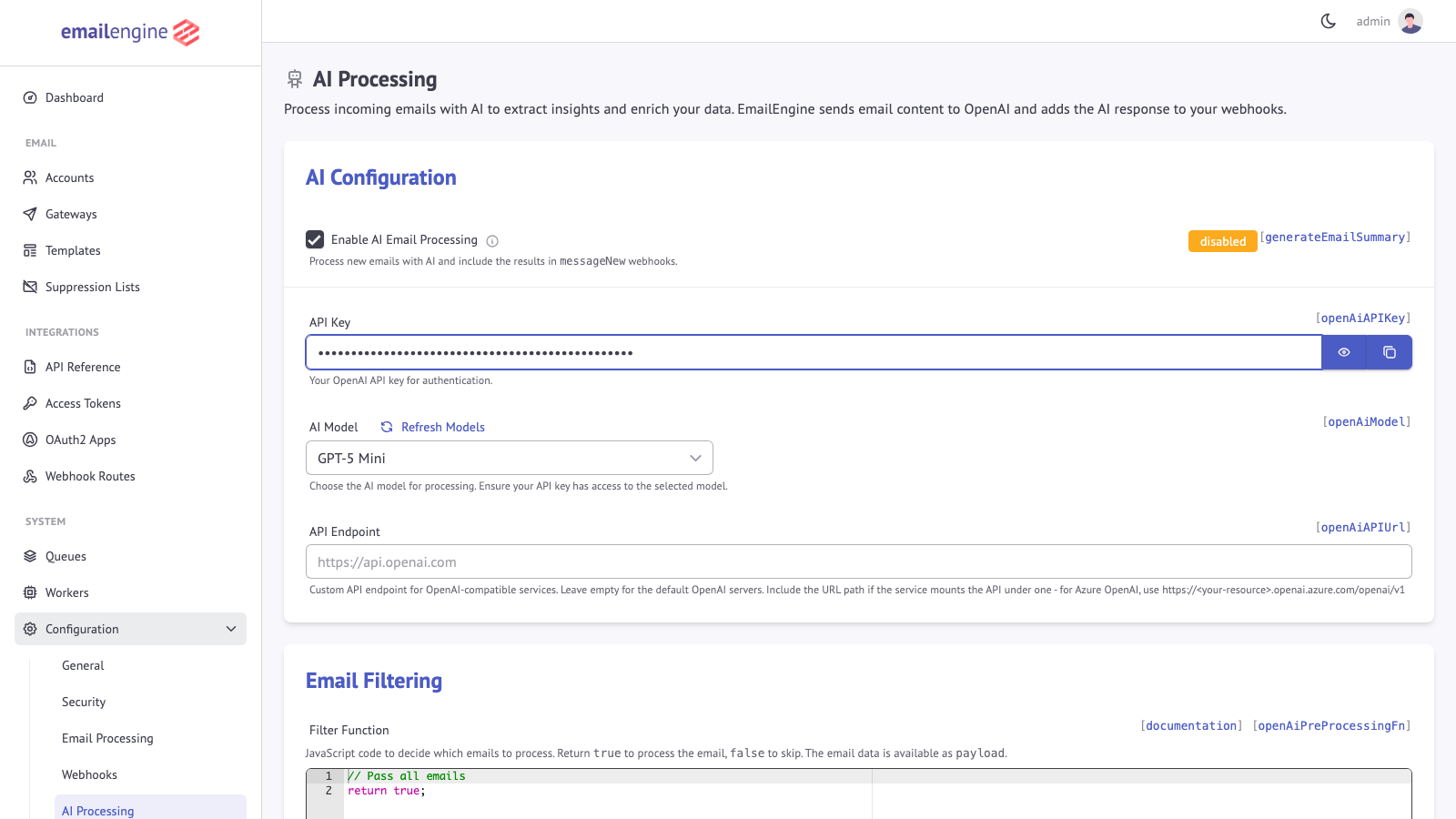 The AI Configuration section with the enable checkbox, API key field and model dropdown
Model Selection
The dropdown is populated from your own API key: Refresh Models calls the model listing endpoint of the configured API and stores what came back, so the choices are whatever that key can use. Until the first refresh, the dropdown offers a small built-in list; in EmailEngine 2.79.4 (August 2026) that list is GPT-5 Mini (gpt-5-mini), GPT-5, and GPT-5 Nano, and the first entry is the one the form starts on.
openAiModel has no built-in default of its own. The admin form always submits the selected entry, but a configuration written through the Settings API must set openAiModel explicitly, or summary requests fail. Email processing is short-context classification and summarization rather than deep reasoning, so the smallest model in the list is the reasonable starting point; move up only if the summaries or the extracted fields are visibly worse than you need, and compare on your own mail.
Because the list comes from the API, a model named here can be retired and a new one can appear without this page changing. Check what the dropdown offers rather than planning around a specific name.
How It Works
When AI processing is enabled, EmailEngine processes every new message whose folder is the account's Inbox (messageSpecialUse of \Inbox) and that is not older than the account's notifyFrom date, and nothing from other folders:
- Email arrives in monitored account
- EmailEngine runs the pre-processing filter, if one is configured
- The headers, sender, subject, attachment list, and text are sent to the API for analysis, with a two-minute timeout per message
- Analysis results are added to the
messageNewwebhook payload
Webhook Enhancement
With AI processing enabled, messageNew webhooks include additional sections:
{
  "account": "example",
  "event": "messageNew",
  "data": {
    "id": "AAAAGQAACeE",
    "from": {
      "name": "Jane Doe",
      "address": "jane@example.com"
    },
    "subject": "Project meeting tomorrow at 2pm",
    "summary": {
      "id": "chatcmpl-7IzVIEp5UL3hdQ3aZJ8AHyrJrt3R0",
      "tokens": 245,
      "model": "gpt-5-mini",
      "sentiment": "positive",
      "summary": "Request to attend project meeting tomorrow at 2pm in conference room A to discuss Q4 roadmap.",
      "shouldReply": true,
      "events": [
        {
          "description": "Project meeting",
          "startTime": "2023-06-07T14:00:00"
        }
      ],
      "actions": [
        {
          "description": "Attend project meeting",
          "dueDate": "2023-06-07"
        }
      ]
    },
    "riskAssessment": {
      "risk": 1,
      "assessment": "Sender information matches and authentication checks have passed."
    }
  }
}
Extracted Information
1. Content Summary
Condensed version of email content (sentence or short paragraph):
{
  "summary": "Request to contribute 2 to 5 euros for flower bouquets for choir teachers and concertmaster."
}
2. Sentiment Assessment
One-word sentiment evaluation:
- positive: Friendly, enthusiastic, grateful
- neutral: Informational, factual
- negative: Complaint, frustration, anger
{
  "sentiment": "positive"
}
3. Reply Expectation
Boolean flag indicating if sender expects a response:
{
  "shouldReply": true
}
4. Events List
Events with dates mentioned in the email:
{
  "events": [
    {
      "description": "Flower bouquets for choir teachers",
      "startTime": "2023-05-22"
    },
    {
      "description": "End of year celebration",
      "startTime": "2023-06-15",
      "endTime": "2023-06-15T18:00:00"
    }
  ]
}
5. Actions List
Tasks recipient is expected to perform:
{
  "actions": [
    {
      "description": "Contribute 2 to 5 euros for flower bouquets",
      "dueDate": "2023-05-22"
    },
    {
      "description": "RSVP for end of year celebration",
      "dueDate": "2023-06-10"
    }
  ]
}
6. Fraud Risk Assessment
Risk score from 1 to 5 (5 being highest risk) with explanation:
{
  "riskAssessment": {
    "risk": 4,
    "assessment": "Email contains urgent request for money transfer and sender domain doesn't match claimed identity. Possible phishing attempt."
  }
}
Note: AI is good at detecting scams but less effective with spam.
Metadata Storage
Token Usage
The tokens field shows OpenAI API tokens consumed:
{
  "summary": {
    "tokens": 2060,
    "model": "gpt-5-mini"
  }
}
Use this to track API costs and usage.
Request ID
The id field contains the OpenAI request ID for troubleshooting:
{
  "summary": {
    "id": "chatcmpl-7IzVIEp5UL3hdQ3aZJ8AHyrJrt3R0"
  }
}
Custom Prompts
Customize the AI analysis by modifying the system prompt:
- Go to Configuration > AI Processing
- Scroll to AI Instructions section
- Edit the AI Prompt
- Add custom instructions
- Save configuration
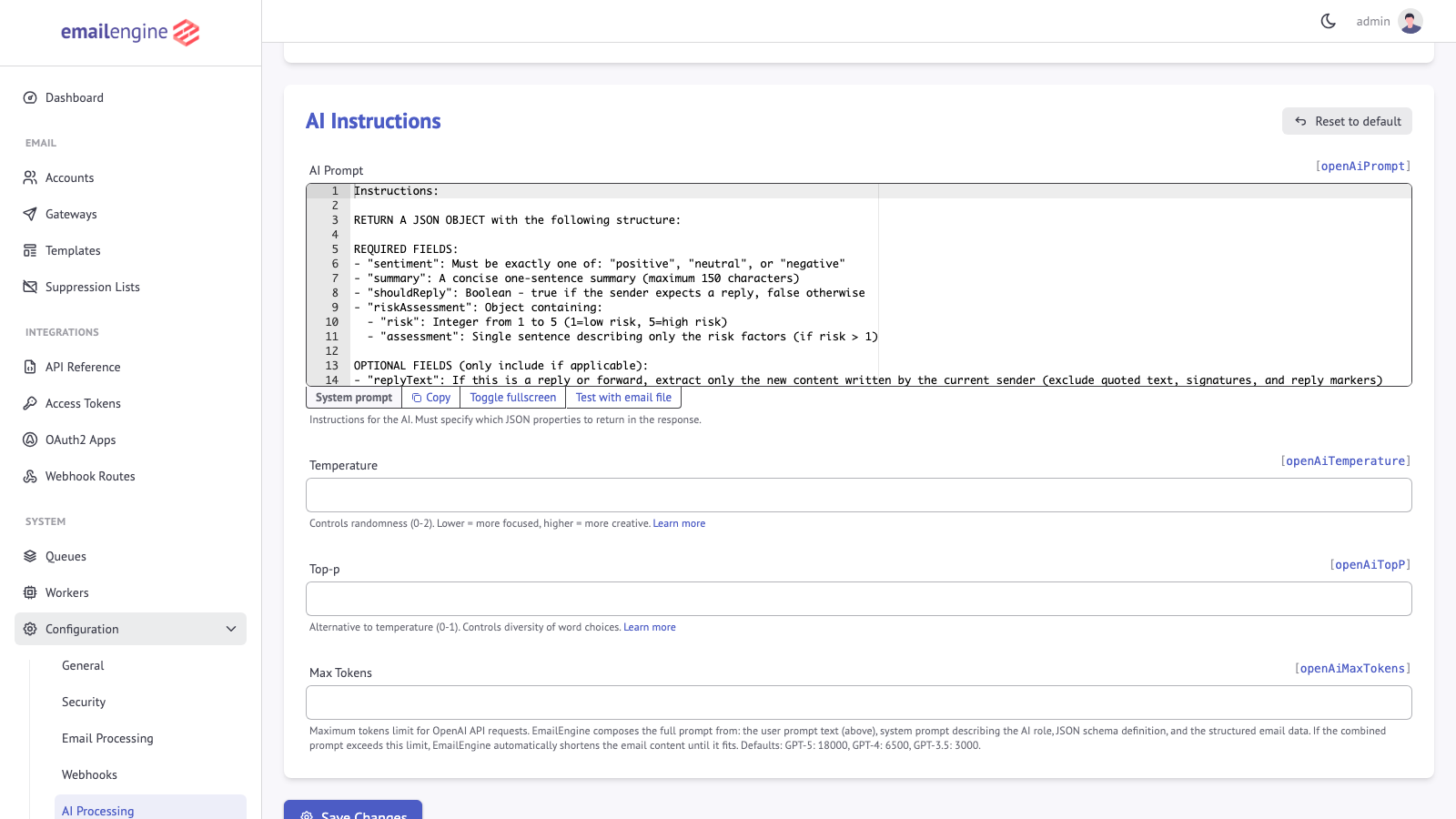 The AI Instructions section holds the editable system prompt
Example: Add Language Detection
Add this line to the prompt:
- Return the ISO language code of the primary language used in the email as the "language" property
Result in webhook:
{
  "summary": {
    "language": "en",
    "summary": "Meeting invitation for tomorrow at 2pm"
  }
}
Example: Custom Classification
Add business-specific classification:
- Classify the email type as "inquiry", "complaint", "order", or "other" in the "emailType" property
Result:
{
  "summary": {
    "emailType": "inquiry",
    "summary": "Customer asking about product availability"
  }
}
Settings Reference
Everything on the Configuration > AI Processing page is also settable through the Settings API:
| Setting | Purpose |
|---|---|
openAiAPIKey | API key. Required before any AI processing runs |
generateEmailSummary | Turn on summaries, sentiment, events, actions, and risk assessment |
openAiGenerateEmbeddings | Turn on embedding generation |
openAiModel | Model name, for example gpt-5-mini. No default |
openAiPrompt | The system prompt, as edited above |
openAiAPIUrl | Base URL of the API. Point this at Azure OpenAI (https://<resource>.openai.azure.com/openai/v1) or an OpenAI-compatible gateway |
openAiTemperature | Sampling temperature, 0 to 2 |
openAiTopP | Nucleus sampling cutoff, 0 to 1 |
openAiMaxTokens | Cap on tokens per request. When unset, the cap follows the model name: 3000 for a name starting with gpt-3, 6500 for gpt-4, and 18000 for gpt-5 and every other name |
openAiPreProcessingFn | JavaScript filter deciding which messages are worth processing, see below. In 2.79.4 a stored filter is also what switches processing on: with the setting empty, no message is processed. The admin form stores return true; when the editor is left at its default, so a configuration written through the Settings API has to set it too |
Lowering openAiMaxTokens truncates long messages before they reach the model, which is the most direct lever on cost. openAiPreProcessingFn is the more selective one, since a message it rejects costs nothing at all.
Handling Failures
EmailEngine skips AI processing if:
- The API request fails or is rate limited
- The request takes longer than two minutes
- The message has no text content
- The pre-processing filter returned a falsy value or threw, or no filter is stored at all (see the settings table above)
In these cases the summary and riskAssessment sections are omitted from the webhook payload, which is otherwise delivered as usual. A failed API call is logged as Failed to fetch summary from OpenAI with the error, and the most recent one is kept for the AI Processing page to display.
Webhook Content Configuration
Text is only fetched for a new message when Include email text and HTML (notifyText) is enabled under Configuration > Webhooks, and it is truncated to the Content Size Limit (notifyTextSize) set there. With text disabled there is nothing to summarize and every message is skipped.
Use Cases and Applications
Everything below is driven from the enriched messageNew payload. Once AI processing is on, your webhook handler branches on the fields rather than calling any additional endpoint:
app.post('/webhook', async (req, res) => {
  res.json({ success: true });

  const { event, data } = req.body;
  if (event !== 'messageNew' || !data.summary) return;

  const { summary, riskAssessment } = data;

  // Fraud triage: risk runs 1 to 5
  if (riskAssessment?.risk >= 4) {
    return quarantine(data.id, riskAssessment.assessment);
  }

  // Tasks and calendar entries the model found in the body
  for (const action of summary.actions || []) {
    await createTask({ title: action.description, dueDate: action.dueDate });
  }

  for (const ev of summary.events || []) {
    await createCalendarEvent({ title: ev.description, start: ev.startTime, end: ev.endTime });
  }

  // Support triage: an unhappy sender who expects an answer goes to the front
  if (summary.sentiment === 'negative' && summary.shouldReply) {
    await escalate(data.id);
  }
});
riskAssessment sits next to summary, not inside itEmailEngine lifts the risk assessment out of the summary object before sending the webhook, so read data.riskAssessment rather than data.summary.riskAssessment.
Which field drives which workflow:
| Field | Typical use |
|---|---|
summary.sentiment | Support triage, escalating negative mail |
summary.shouldReply | Priority inbox, SLA timers, follow-up reminders |
summary.actions[] | Creating tasks with a description and dueDate |
summary.events[] | Creating calendar entries from startTime and endTime |
riskAssessment.risk | Fraud and phishing quarantine, 1 to 5 |
The model does not always populate every field. Treat each one as optional and fall back to your existing routing when it is missing, since an OpenAI outage or a rate limit leaves the message delivered but unenriched. See Handling Failures.
6. Smart Email Search Assistant
The POST /v1/chat/{account} endpoint is part of the Document Store feature, which is deprecated and will be removed from EmailEngine releases starting October 1, 2026. After that release, syncing to Elasticsearch, chat with email, and unified search are gone. Do not build new integrations on this endpoint.
Until then it is disabled by default: since v2.71.0 the endpoint returns 404 unless you enable the startup gate (EENGINE_DOCUMENT_STORE_ENABLED=true) in addition to turning on Document Store (Elasticsearch) indexing and the "Chat with emails" feature. It is also left out of the API reference on this site, though EmailEngine's own OpenAPI document still describes it.
Build conversational email search for users:
cURL:
curl -X POST "https://emailengine.example.com/v1/chat/user123" \
  -H "Authorization: Bearer <TOKEN>" \
  -H "Content-Type: application/json" \
  -d '{
    "question": "Did I receive the invoice from Acme Corp?"
  }'
Response:
{
  "success": true,
  "answer": "Yes, you received an invoice from Acme Corp on October 5th for $1,500.",
  "messages": [
    {
      "id": "AAAAGQAACeE",
      "from": {
        "name": "Acme Corp",
        "address": "billing@acmecorp.com"
      },
      "subject": "Invoice #12345",
      "date": "2023-10-05T10:00:00.000Z"
    }
  ]
}
The response carries the generated answer along with the messages it was drawn from, so you can link the reader back to the source email rather than asking them to trust the summary.
Privacy and Compliance
Data Processing
Important: When AI processing is enabled, EmailEngine sends the headers, sender, subject, attachment list, and text of every processed message to the configured API endpoint, which is OpenAI unless openAiAPIUrl points elsewhere.
Provider Terms: What the provider does with that data is governed by its own API terms, not by EmailEngine. Read the current data-usage terms of the provider you configure before enabling the feature.
Your Responsibility: Verify this behavior complies with:
- User data processing agreements
- GDPR requirements
- Industry-specific regulations (HIPAA, etc.)
- Company privacy policies
User Consent
Recommendations:
- Transparent Disclosure: Inform users that AI processes their emails
- Opt-In: Allow users to enable/disable AI processing
- Data Retention: Clarify how long AI-processed data is stored
- Third-Party Processing: Disclose data sent to OpenAI
Per-Account Control
There is no per-account switch, but the pre-processing filter below receives the account ID, so a filter that returns true only for listed accounts limits processing to those:
const optedIn = ["user-1", "user-2"];
return optedIn.includes(payload.account);
AI Pre-Processing Filter (openAiPreProcessingFn)
With the filter at its default (return true;, which is what the admin form stores when the editor is left alone), AI processing is applied to every incoming email in the Inbox. The openAiPreProcessingFn setting holds a JavaScript function that decides which of those emails get processed, which is the most direct control over AI usage and costs. In 2.79.4 the setting has to be present for any processing to happen: an empty filter switches processing off rather than passing everything.
How It Works
When configured, the pre-processing filter runs before any AI processing occurs:
- New email arrives in the account's Inbox
- Pre-processing filter function evaluates the email
- If the function returns a truthy value, the email is sent to the API for analysis
- If it returns a falsy value or throws, AI processing is skipped
Configuration
Configure the filter via the Settings API:
curl -X POST "https://emailengine.example.com/v1/settings" \
  -H "Authorization: Bearer YOUR_TOKEN" \
  -H "Content-Type: application/json" \
  -d '{
    "openAiPreProcessingFn": "// Only process emails from specific domains\nconst senderDomain = payload.from?.address?.split(\"@\")[1];\nif ([\"important-client.com\", \"vip-customer.org\"].includes(senderDomain)) {\n  return true;\n}\nreturn false;"
  }'
Filter Function Structure
The filter function receives the message itself as payload, not a webhook envelope: the message fields sit at the top level next to payload.account, so it is payload.from and payload.subject here, where a webhook filter would read payload.data.from. Return a truthy value to allow AI processing:
// payload is the new message, with the account ID added
// Return true to process with AI, false to skip

// Skip automated emails
if (payload.headers && payload.headers["auto-submitted"]) {
  return false;
}

// Skip emails from no-reply addresses
if (payload.from?.address?.includes("noreply")) {
  return false;
}

// Process all other emails
return true;
Example Filters
1. Process Only High-Priority Senders
// Only AI-process emails from VIP domains
const vipDomains = ["client.com", "partner.org", "executive.net"];
const senderDomain = payload.from?.address?.split("@")[1]?.toLowerCase();

if (vipDomains.includes(senderDomain)) {
  return true;
}
return false;
2. Skip Newsletters and Automated Messages
// Skip common newsletter and automated email patterns
const from = payload.from?.address?.toLowerCase() || "";
const subject = payload.subject?.toLowerCase() || "";

// Skip newsletters
if (from.includes("newsletter") || from.includes("digest")) {
  return false;
}

// Skip automated messages
if (payload.headers?.["auto-submitted"] || payload.headers?.["x-auto-response-suppress"]) {
  return false;
}

// Skip common notification subjects
if (subject.includes("notification") || subject.includes("alert")) {
  return false;
}

return true;
3. Process Based on Subject Keywords
// Only process emails with specific keywords
const subject = payload.subject?.toLowerCase() || "";
const keywords = ["urgent", "invoice", "contract", "proposal", "meeting"];

for (const keyword of keywords) {
  if (subject.includes(keyword)) {
    return true;
  }
}
return false;
4. Size-Based Filtering
// Skip very short or very long emails (likely spam or bulk)
const textSize = payload.text?.encodedSize?.plain || 0;

if (textSize < 50) {
  // Too short - likely spam
  return false;
}
if (textSize > 50000) {
  // Too long - will consume many tokens
  return false;
}
return true;
5. Time-Based Processing
// Only process recent emails (skip old backlog)
const emailDate = new Date(payload.date);
const now = new Date();
const hoursDiff = (now - emailDate) / (1000 * 60 * 60);

// Skip emails older than 24 hours
if (hoursDiff > 24) {
  return false;
}
return true;
Available Payload Data
payload is the message object EmailEngine built for the messageNew event (the same fields that end up under data in the webhook), with the account ID added at the top level:
payload.account;           // Account ID
payload.path;              // Mailbox path (e.g., "INBOX")
payload.messageSpecialUse; // Always "\\Inbox" here; other folders are never processed
payload.id;                // Message ID
payload.from;              // { name, address }
payload.to;                // [{ name, address }, ...]
payload.subject;           // Email subject
payload.date;              // Message date
payload.headers;           // Lowercased header name to array of values
payload.text;              // { plain, html, encodedSize: { plain, html } }
payload.attachments;       // Attachment metadata array
The Test Filter dialog on the AI Processing page runs the same function in the browser against a sample message of this shape.
Execution Environment
The filter function runs in the same execution context as other pre-processing functions:
Available:
- Standard JavaScript, with top-level
await fetch- HTTP requests through EmailEngine's own HTTP agent, andURLenv- Script environment variables (the parsedscriptEnvsetting)logger- Pino.js logger for debugging
Not injected as globals:
require()- modules are not provided- Filesystem or system helpers are not provided
Filter and pre-processing functions run on Node's vm module, which is an isolation convenience, not a hardened security boundary - code executed here can reach the host process and runs with full server privileges. Only enable and author functions you fully trust; never expose function authoring to untrusted users. See Execution Environment.
Debugging Filters
Errors in the filter function are logged and the email is skipped (treated as returning false). The Error Log tab next to the filter editor on the AI Processing page keeps the last 20 errors with the payload that triggered each. The same errors go to EmailEngine's log with the component llm-pre-process:
# View filter-related log entries
journalctl -u emailengine | grep "llm-pre-process"
You can also use the logger for debugging:
logger.info({ from: payload.from?.address, subject: payload.subject, msg: "Evaluating email" });

const result = payload.path === "INBOX";
logger.info({ result, msg: "Filter decision" });

return result;
Best Practices
- Start broad, then narrow - Begin with minimal filtering and add rules as needed
- Monitor costs - Track token usage to measure filter effectiveness
- Log decisions - Use
loggerto track why emails are filtered - Handle missing data - Use optional chaining (
?.) for potentially undefined values - Keep it fast - Complex logic adds processing overhead
Cost Management
Estimating Costs
The provider charges per token, at a rate that depends on the model and changes over time; check the provider's own pricing page. Every processed message costs the prompt (the system prompt plus the headers, subject, and text, capped by openAiMaxTokens) and the structured answer. The tokens field in each enriched webhook reports the exact total, so a day of real traffic gives a better estimate than any figure this page could state.
Cost Optimization
- Pick the smallest model that gives usable output: the fallback list orders them from smallest to largest
- Filter Emails:
openAiPreProcessingFnrejects messages before they cost anything; Inbox-only processing is already built in - Cap the input: a lower
openAiMaxTokenstruncates long messages before they reach the model - Monitor Usage: Track the
tokensfield in webhooks per account
Monitoring Token Usage
Every enriched messageNew payload reports what the call cost, so metering needs no separate bookkeeping against OpenAI:
app.post('/webhook', (req, res) => {
  res.json({ success: true });

  const { summary } = req.body.data || {};
  if (!summary) return; // AI processing off, skipped, or failed

  metrics.increment('openai.tokens', summary.tokens, {
    model: summary.model,
    account: req.body.account
  });
});
Aggregating by account shows which mailboxes drive the spend, which is usually a small number of high-volume ones. See Cost Optimization for narrowing what gets processed.
See Also
- MCP for AI agents - The opposite direction: an agent calling EmailEngine
- Pre-processing functions - Filtering which messages reach a model
- Webhooks overview - Where the enriched payload arrives
- Compliance and data handling - What leaves the instance when AI processing is on