Web-Safe HTML
Email HTML is not web page HTML. It arrives with unclosed tags, global stylesheets that leak into your layout, cid: image references a browser cannot resolve, and occasionally with scripts. Dropping it straight into a page breaks the page.
EmailEngine can hand you a version that is safe to inject directly. Ask for it with a single query parameter, and you get sanitized markup with inline images already embedded and quoted reply history folded behind one control.
curl "https://emailengine.example.com/v1/account/example/message/AAAAAQAACnA?webSafeHtml=true" \
  -H "Authorization: Bearer YOUR_ACCESS_TOKEN"
The response carries the processed markup in text.html and sets text.webSafe to true.
Requesting Web-Safe HTML
Add webSafeHtml=true to the get message endpoint. It is a shorthand that overrides three other parameters:
| Parameter | Value it forces | Effect |
|---|---|---|
textType | * | Include both the plain text and HTML bodies |
preProcessHtml | true | Sanitize and repair the HTML |
embedAttachedImages | true | Replace cid: references with data URIs |
webSafeHtml=true is the option to reach for when the goal is "give me something I can display".
An explicit embedAttachedImages=false alongside it is honored: you get the sanitized, repaired HTML with the cid: references left as they are, which is what you want when the consumer reads the body rather than renders it - EmailEngine's own MCP tools request exactly that combination. Only embedAttachedImages works this way; textType and preProcessHtml are pinned by the shorthand.
Response:
{
  "id": "AAAAAQAACnA",
  "subject": "Re: Meeting Tomorrow",
  "from": {
    "name": "John Doe",
    "address": "john@example.com"
  },
  "text": {
    "id": "AAAAAgAACqiTkaExkaEykA",
    "encodedSize": {
      "plain": 1013,
      "html": 1630
    },
    "plain": "Works for me.\n\nOn Mon, Oct 13, 2025 at 10:23 AM Jane Smith wrote:\n> Let's meet tomorrow at 10am.",
    "html": "<div>Works for me.</div><details class=\"ee-collapsed-thread\"><summary class=\"ee-collapsed-thread-toggle\"></summary><div class=\"gmail_quote\">...</div></details>",
    "webSafe": true,
    "hasMore": false
  }
}
Note that text.plain is untouched. Only the HTML is processed.
On the message text endpoint
The message text endpoint takes the same webSafeHtml=true, which is how you fetch a long body that get message reported as hasMore. There it returns a single rendering rather than the raw parts:
{
  "html": "<div>Works for me.</div><details class=\"ee-collapsed-thread\">...</details>",
  "webSafe": true,
  "hasMore": false
}
No plain field comes back with it: when a message carries no HTML part, the plaintext one is rendered into HTML instead, so the response is one body rather than two copies of the same message.
What the Processing Does
The two-wrapper output, rel="noopener noreferrer" on links and the removal of SVG and MathML arrived in EmailEngine v2.84.2. Earlier versions return one wrapper that also carries the body's styles, set only target="_blank" on a elements, and keep inline SVG and MathML.
Sanitization. The HTML goes through DOMPurify, twice when the message carries a stylesheet (before and after style inlining) and once otherwise. Only HTML is kept: inline SVG and MathML are removed whole, as the major webmail clients do, because the namespace confusion between the three is where most sanitizer bypasses have come from. Scripts, event handlers, embedding tags and form controls are removed: script, iframe, frame, frameset, noframes, object, embed, applet, canvas, audio, video, noscript, dialog, template, form, input, button, select and textarea, plus the document-level title, meta, link, base, and basefont. The action, formaction, popover and popovertarget attributes are dropped wherever they appear. Only the first 256 KB of style text in a message is kept, and a message whose markup nests more than 1,000 levels deep, or that the sanitizer cannot process at all, is rendered as escaped plain text instead.
Structure repair. Unclosed and malformed markup is normalized into valid HTML. The result is the content of the message body only, a fragment rather than a full document, so you can inject it into a container element. It comes as two wrappers: an outer <div style="overflow: auto; contain: paint;"> that carries nothing else, and inside it a <div> holding the sanitized styles of the message's own body. The outer element clips everything the message does, so a negative margin, a display: contents or a wide box-shadow on the body stays inside it instead of painting over your page, and the paint containment makes it the containing block of any positioned descendant as well.
Style inlining. Stylesheets are inlined onto the elements they apply to with juice, then the style tags themselves are dropped. This is what stops an email's global rules from reaching the rest of your page. CSS properties that could break out of the container are stripped from the surviving inline styles, including position, float, clear, zoom, clip, all, paint-order, the animation-* family, the offset-* family, and the scrollbar-* family. position matters most: it is the one property that escapes an overflow clip. Width and height constraints are removed from the body element, so the message cannot size the container you gave it.
Links. Every a and area element gets target="_blank" and rel="noopener noreferrer", whatever rel it came with. Browsers imply noopener for target="_blank" on their own, but a sender's rel="opener" would opt back in and hand the opened page a window.opener that can navigate the page showing the message.
Inline images. Images referenced by cid: in a src, srcset or background attribute are replaced with base64 data URIs, so they render without a second request. A cid: reference anywhere else, such as a link href, is left as it is: the sanitizer refuses data: URLs on links, and the embedding step does not hand a sender one. The attachments still appear in the attachments array with their metadata. See Working with Attachments for the difference between inline and downloadable attachments.
Plain text messages. A message with no HTML part is converted from its plain text body, with quoted lines rendered as nested blockquotes in graduated shades of blue.
Web-safe HTML is safe to render. It is not a guarantee about intent. The markup still comes from whoever sent the message, and anything DOMPurify permits, including class names, survives. See Relabel, do not trust for a concrete case.
Quoted Thread History
Folding quoted thread history requires EmailEngine v2.75.0 or later. Earlier versions return web-safe HTML without the collapse marker.
A reply that quotes the entire conversation is mostly conversation. Rendered as-is, the two lines someone actually wrote sit on top of a wall of history, and every message in a thread looks nearly identical.
EmailEngine finds the point where the sender stopped writing and wraps everything after it in a single element:
<div>Works for me.</div>
<details class="ee-collapsed-thread">
  <summary class="ee-collapsed-thread-toggle"></summary>
  <div class="gmail_quote">On Mon, Oct 13, 2025 at 10:23 AM Jane Smith wrote: ...</div>
</details>
Because details is closed by default, a message renders as what the sender wrote until the reader opens it. No JavaScript is required for the basic behavior.
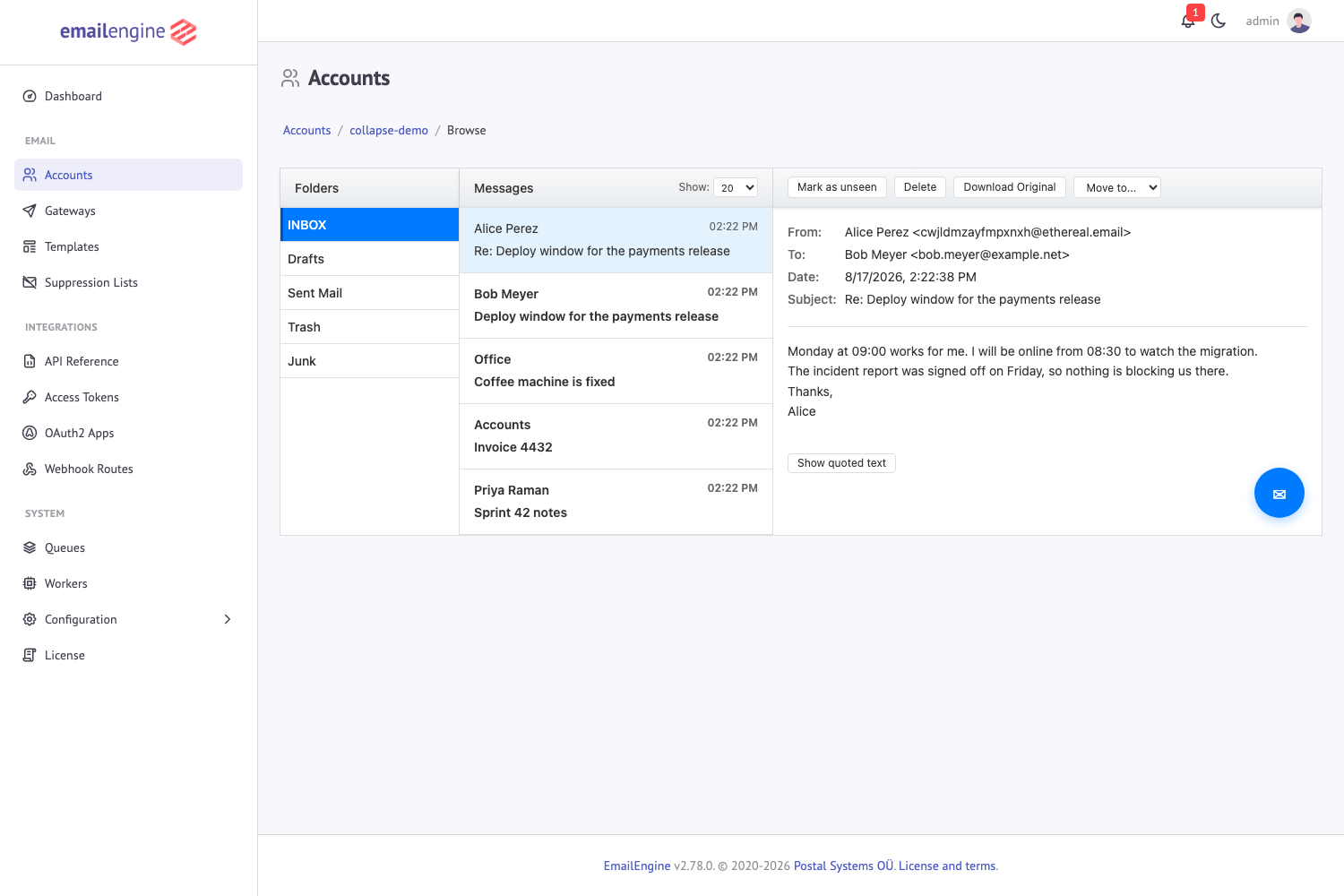
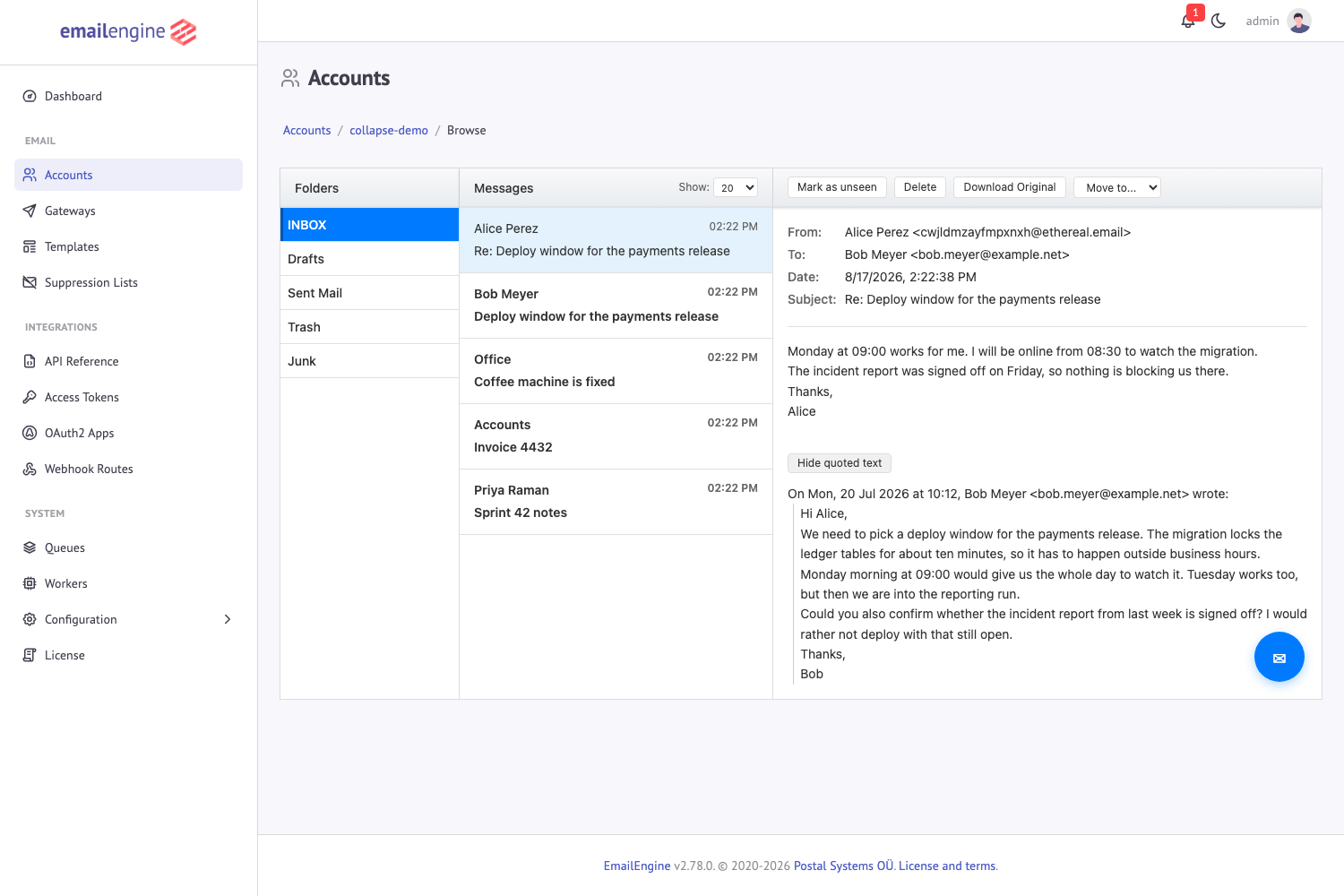
Here is the same reply in EmailEngine's own message browser, which labels the control "Show quoted text". Only the two sentences the sender wrote are on screen:
Opening the control reveals the quoted message underneath:
The Marker Contract
| Class | Element | Purpose |
|---|---|---|
ee-collapsed-thread | details | Wraps the folded history |
ee-collapsed-thread-toggle | summary | The control that opens and closes it |
The marker carries structure and class names, and nothing else. There is no label text and no styling.
The empty summary is deliberate. A renderer that knows about the marker supplies its own label, in its own wording and language. A renderer that strips unknown elements is left with the body it would have received anyway. If you display web-safe HTML without handling the marker, readers see a bare disclosure triangle with no text next to it, so supplying a label is the one thing worth doing.
Rendering It
Label the summary and style it however your interface styles controls:
container.querySelectorAll('details.ee-collapsed-thread > summary.ee-collapsed-thread-toggle').forEach(toggle => {
  const details = toggle.parentElement;
  const applyLabel = () => {
    toggle.textContent = details.open ? 'Hide quoted text' : 'Show quoted text';
  };

  applyLabel();
  details.addEventListener('toggle', applyLabel);
});
.ee-collapsed-thread-toggle {
  display: inline-block;
  padding: 4px 10px;
  border: 1px solid #ddd;
  border-radius: 4px;
  background: white;
  cursor: pointer;
  user-select: none;
  /* The message brings its own fonts along, the control keeps yours */
  font-family: inherit;
  list-style: none;
}

/* Safari before it supported list-style on a summary */
.ee-collapsed-thread-toggle::-webkit-details-marker {
  display: none;
}
Relabel, Do Not Trust
A sender can put the same markup in their own HTML, and it survives sanitization. Set the label on every match rather than only on empty ones, so the control always reads as one of your two labels instead of whatever text arrived with the message. The example above does this: it assigns textContent unconditionally.
When History Is Not Folded
Folding is conservative. It is skipped, and the message renders whole, when any of these hold:
- The message has nothing to fold. A first message in a thread carries no history.
- Nothing would be left visible. A message that is only quoted history stays expanded, because folding it would leave a button and no message.
- The tail is shorter than 120 characters. Hiding two lines behind a click adds noise rather than removing it.
- The cut point falls inside a table, where a wrapper element cannot be placed without the HTML parser moving it out of the table.
- The HTML and plain text bodies together exceed 256K characters. Detection is skipped on very large messages to bound the work done per message.
- Only the plain text body could be analysed while a usable HTML part exists. Generating the body from text there would fold the history at the cost of discarding the sender's real HTML.
Signatures are never folded. Only reply history, forwarded content, and disclaimers are, and only where detection was confident.
If detection fails for any other reason, the whole message is rendered. A message that cannot be folded is still a message.
Turning Folding Off
Set the environment variable to restore the previous output shape:
EENGINE_DISABLE_THREAD_COLLAPSE=true
See Environment Variables for the full list.
Web-Safe HTML in Webhooks
Webhook payloads can carry the same processed HTML. Enable it in Configuration > Webhooks (the Sanitize HTML for web display checkbox) or through the settings API:
curl -X POST "https://emailengine.example.com/v1/settings" \
  -H "Authorization: Bearer YOUR_ACCESS_TOKEN" \
  -H "Content-Type: application/json" \
  -d '{
    "notifyText": true,
    "notifyWebSafeHtml": true
  }'
notifyText must be on as well, since notifyWebSafeHtml changes how the text content is rendered rather than whether it is included.
With both enabled, data.text.html in a messageNew payload holds the web-safe version instead of the raw HTML and data.text.webSafe is true. The collapse marker appears here too, so a webhook consumer that renders message HTML needs to handle it the same way.
Inline images of up to 2 MB encoded are embedded in the webhook body as data URIs. A larger image keeps its cid: reference, and a consumer that wants it fetches it from the attachment endpoint. Before v2.82.0 the webhook body kept every reference as cid:.
There is no separate field holding the raw HTML. If you need the original markup, fetch it from the API without webSafeHtml.
See Also
- Message Operations - Listing, fetching, and managing messages
- Working with Attachments - Inline images and downloadable files
- messageNew Webhook - Payload structure for new message events
- Webhook Events Reference - All events and their fields
- Environment Variables - Configuration reference