Delivery Testing and Inbox Placement
Measure email deliverability by monitoring test mailboxes with EmailEngine. Track whether your emails land in the inbox or spam folder, and for Gmail, which category tab they appear in.
Overview
Common use case: Send test emails to seed list accounts and immediately check:
- Did the email arrive in INBOX or Spam?
- For Gmail: Which tab? (Primary, Promotions, Social, Updates, Forums)
- How long did delivery take?
- Were there any delivery issues?
EmailEngine's sub-connections feature enables real-time monitoring of multiple folders simultaneously, eliminating polling delays for instant delivery results.
The Challenge
Normal IMAP Behavior
IMAP clients can only subscribe to one folder at a time for real-time updates:
- EmailEngine subscribes to INBOX (or Gmail's "All Mail") for live updates
- Other folders (Spam, Junk, etc.) are polled periodically
- Polling introduces delays (typically 1-5 minutes)
- Gmail's "All Mail" doesn't include Spam or Trash folders, requiring polling
This is fine for normal operations but problematic for delivery testing where you need immediate results.
The Solution: Sub-Connections
Sub-connections allow EmailEngine to establish additional IMAP sessions for specific folders:
- Each sub-connection monitors a specific folder in real-time
- IMAP servers notify EmailEngine about changes immediately
- No polling delay - instant delivery detection
- Perfect for spam folder monitoring
Important Limitation: Email providers heavily limit parallel IMAP connections:
- Gmail: 15 concurrent connections max
- Outlook: 10-15 concurrent connections
- Yahoo: Similar limits
Use sub-connections sparingly. EmailEngine prioritizes the primary connection and only establishes sub-connections after the main session is stable.
Setting Up Delivery Testing
1. Create Test Account
Register a test email account (Gmail, Outlook, etc.) with EmailEngine:
curl -XPOST "http://localhost:3000/v1/account" \
  -H "Content-Type: application/json" \
  -H "Authorization: Bearer YOUR_TOKEN" \
  -d '{
    "account": "test-account",
    "name": "Delivery Test Account",
    "email": "deliverytest@gmail.com",
    "imap": {
      "host": "imap.gmail.com",
      "port": 993,
      "secure": true,
      "auth": {
        "user": "deliverytest@gmail.com",
        "pass": "app-password-here"
      }
    },
    "subconnections": ["\\\\Junk"]
  }'
Key field: subconnections array specifies additional folders to monitor.
2. Using Special-Use Flags
Instead of folder paths, use special-use flags (automatically resolved):
{
  "subconnections": ["\\Junk"]  // Spam/Junk folder
}
Common special-use flags:
\\Junk- Spam folder\\Trash- Deleted items\\Sent- Sent messages\\Drafts- Draft messages
EmailEngine resolves these to actual folder paths automatically.
3. Using Folder Paths
Or specify exact folder paths:
{
  "subconnections": ["[Gmail]/Spam", "Promotions"]
}
Gmail folder names:
[Gmail]/Spam- Spam folder[Gmail]/All Mail- All mail (default primary connection)[Gmail]/Sent Mail- Sent items[Gmail]/Trash- Trash
Outlook folder names:
Junk Email- Spam folderDeleted Items- TrashSent Items- Sent mail
4. Multiple Sub-Connections
Monitor multiple folders simultaneously:
curl -XPOST "http://localhost:3000/v1/account" \
  -H "Content-Type: application/json" \
  -H "Authorization: Bearer YOUR_TOKEN" \
  -d '{
    "account": "test-account",
    "email": "test@ethereal.email",
    "imap": {
      "host": "imap.ethereal.email",
      "port": 993,
      "secure": true,
      "auth": {
        "user": "test@ethereal.email",
        "pass": "password123"
      }
    },
    "subconnections": [
      "\\\\Junk",
      "\\\\Trash"
    ]
  }'
Verifying Sub-Connections
Check which sub-connections are active in the EmailEngine UI:
- Navigate to Accounts
- Click on test account
- Scroll to IMAP section
- View Sub-connections list
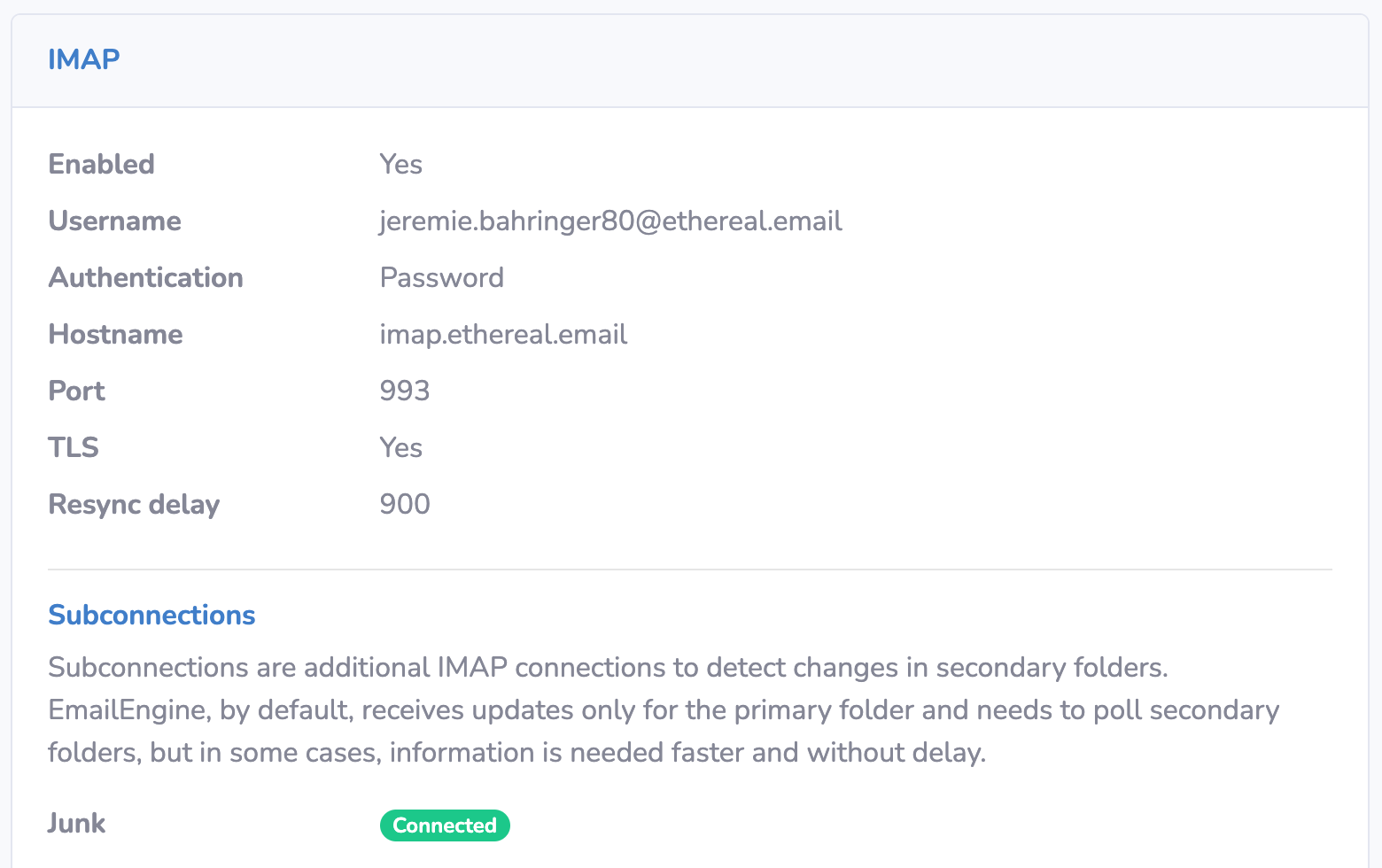
Note: EmailEngine skips duplicate connections. If you request INBOX as a sub-connection and EmailEngine already monitors it as the primary connection, it won't appear in the sub-connections list.
You can also check via API:
curl "http://localhost:3000/v1/account/test-account" \
  -H "Authorization: Bearer YOUR_TOKEN" \
  | jq '.subconnections'
Response (returns the configured folder paths as an array):
["[Gmail]/Spam", "\\Junk"]
Gmail Category Detection
Gmail sorts inbox emails into category tabs:
- Primary - Personal emails, direct correspondence
- Social - Social media notifications
- Promotions - Marketing emails, offers
- Updates - Confirmations, receipts, statements
- Forums - Mailing lists, discussion groups

Enable Category Detection
Category detection requires additional IMAP commands per email, which can slow processing for high-volume accounts. Enable only when needed.
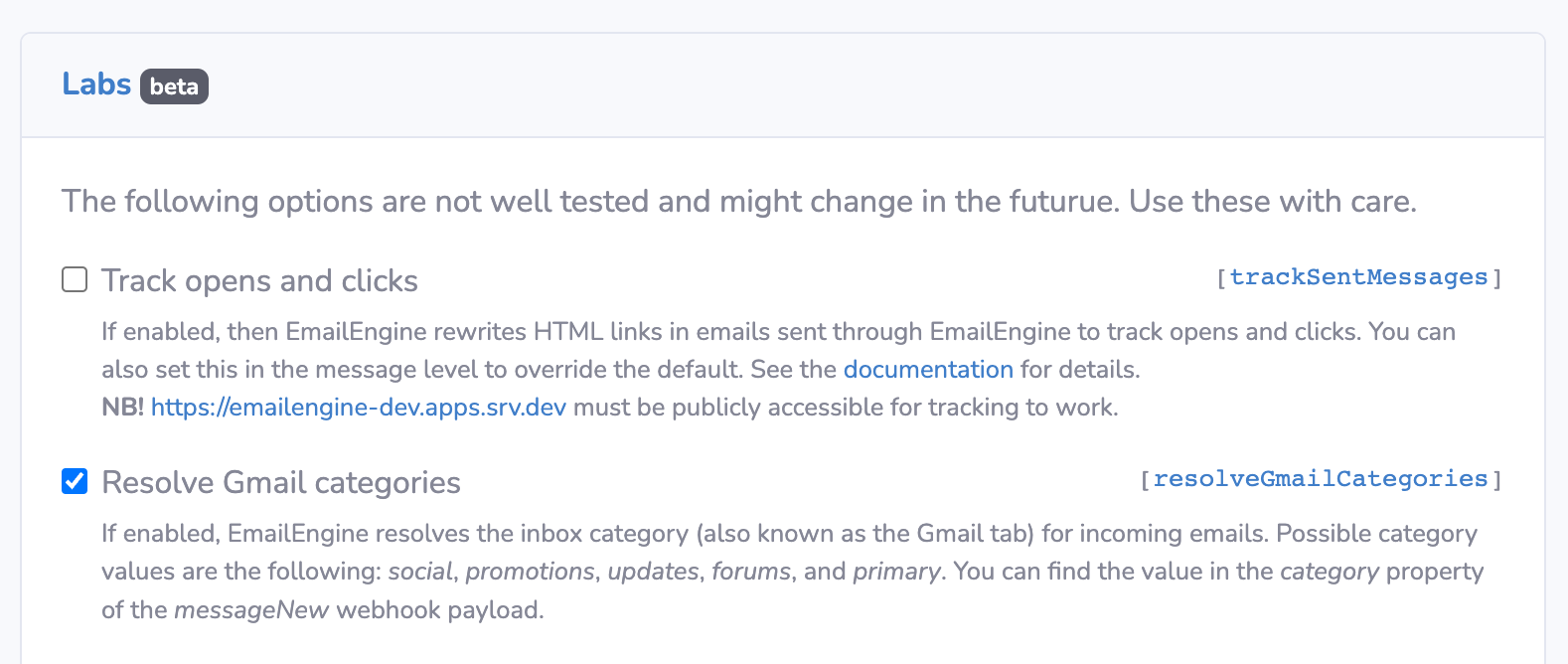
Enable in UI
- Go to Configuration → General Settings
- Scroll to the Gmail Features section
- Enable Detect Gmail Categories (IMAP)
- Save changes
Enable via Settings API
curl -X POST "http://localhost:3000/v1/settings" \
  -H "Authorization: Bearer YOUR_TOKEN" \
  -H "Content-Type: application/json" \
  -d '{"resolveGmailCategories": true}'
Or pre-configure at startup using the EENGINE_SETTINGS environment variable:
EENGINE_SETTINGS='{"resolveGmailCategories":true}' node server.js
Category in Webhooks
Once enabled, messageNew webhooks for Gmail INBOX emails include a category field:
{
  "event": "messageNew",
  "account": "test@gmail.com",
  "data": {
    "id": "AAAABgAAAdk",
    "path": "INBOX",
    "subject": "Special Offer - 50% Off!",
    "category": "promotions",
    "from": {
      "address": "marketing@example.com"
    }
  }
}
Possible category values:
primarysocialpromotionsupdatesforumsreservationspurchases
Implementing Delivery Tests
Complete Testing Flow
// Pseudo code - implement in your preferred language

// Track test emails
test_emails = {}

// 1. Send test email
function send_test_email(test_account, subject, content):
  test_id = 'test-' + CURRENT_TIMESTAMP()

  // Send email with tracking ID in subject
  response = HTTP_POST(
    'http://localhost:3000/v1/account/sender@example.com/submit',
    headers={
      'Authorization': 'Bearer YOUR_TOKEN',
      'Content-Type': 'application/json'
    },
    body=JSON_ENCODE({
      to: { address: test_account },
      subject: subject + ' [Test:' + test_id + ']',
      text: content,
      html: '<p>' + content + '</p>'
    })
  )

  data = PARSE_JSON(response.body)

  // Store test metadata
  test_emails[test_id] = {
    messageId: data.messageId,
    testAccount: test_account,
    subject: subject,
    sentAt: CURRENT_TIMESTAMP(),
    result: null
  }

  return test_id
end function

// 2. Receive webhook when email arrives
function handle_webhook(request):
  webhook = request.body

  if webhook.event == 'messageNew':
    subject = webhook.data.subject
    path = webhook.data.path
    category = webhook.data.category

    // Extract test ID from subject
    test_match = REGEX_MATCH(subject, '\[Test:([^\]]+)\]')

    if test_match:
      test_id = test_match[1]
      test = test_emails[test_id]

      if test exists:
        // Record delivery result
        delivery_time = CURRENT_TIMESTAMP() - test.sentAt

        // Determine status
        if path == 'INBOX':
          status = 'inbox'
        else if CONTAINS(path, 'Junk') OR CONTAINS(path, 'Spam'):
          status = 'spam'
        else:
          status = 'other'
        end if

        test.result = {
          folder: path,
          category: category,
          deliveredAt: CURRENT_TIMESTAMP(),
          deliveryTime: delivery_time + 'ms',
          status: status
        }

        PRINT('Test ' + test_id + ' result: ' + test.result)
      end if
    end if
  end if

  RESPOND(200, { success: true })
end function

// 3. Query test results
function get_test_results(test_id):
  test = test_emails[test_id]

  if NOT test exists:
    return ERROR(404, 'Test not found')
  end if

  return {
    testId: test_id,
    sentAt: test.sentAt,
    result: test.result OR { status: 'pending' }
  }
end function

// Run test
function run_delivery_test():
  test_id = send_test_email(
    'deliverytest@gmail.com',
    'Delivery Test Email',
    'This is a test email to measure inbox placement.'
  )

  PRINT('Test started: ' + test_id)

  // Wait for result (or poll)
  SLEEP(10000)  // Wait 10 seconds
  test = test_emails[test_id]
  PRINT('Test result: ' + test.result)
end function
Seed List Testing
Test multiple accounts simultaneously:
// Pseudo code - implement in your preferred language

function run_seed_list_test(subject, content):
  seed_list = [
    'test1@gmail.com',
    'test2@outlook.com',
    'test3@yahoo.com',
    'test4@gmail.com'
  ]

  results = {
    testId: 'seed-' + CURRENT_TIMESTAMP(),
    sentAt: CURRENT_TIMESTAMP(),
    accounts: []
  }

  // Send to all seed accounts
  for each email in seed_list:
    test_id = send_test_email(email, subject, content)

    APPEND(results.accounts, {
      email: email,
      testId: test_id,
      status: 'pending'
    })
  end for

  PRINT('Seed list test started: ' + results.testId)

  return results
end function

// Check results after delay
function check_seed_list_results(test_results):
  completed = []
  pending = []

  for each account in test_results.accounts:
    test = test_emails[account.testId]

    if test.result exists:
      APPEND(completed, {
        email: account.email,
        ...test.result
      })
    else:
      APPEND(pending, account.email)
    end if
  end for

  // Count by status
  inbox_count = COUNT(completed WHERE status == 'inbox')
  spam_count = COUNT(completed WHERE status == 'spam')
  other_count = COUNT(completed WHERE status == 'other')

  return {
    total: LENGTH(test_results.accounts),
    completed: LENGTH(completed),
    pending: LENGTH(pending),
    results: {
      inbox: inbox_count,
      spam: spam_count,
      other: other_count
    },
    details: completed
  }
end function
Python Example
import requests
import time
from datetime import datetime

class DeliveryTester:
    def __init__(self, api_url, token):
        self.api_url = api_url
        self.token = token
        self.test_emails = {}

    def send_test_email(self, test_account, subject, content):
        test_id = f"test-{int(time.time() * 1000)}"

        # Send email
        response = requests.post(
            f"{self.api_url}/v1/account/sender@example.com/submit",
            headers={
                'Authorization': f'Bearer {self.token}',
                'Content-Type': 'application/json'
            },
            json={
                'to': {'address': test_account},
                'subject': f"{subject} [Test:{test_id}]",
                'text': content
            }
        )

        data = response.json()

        # Store test metadata
        self.test_emails[test_id] = {
            'message_id': data['messageId'],
            'test_account': test_account,
            'subject': subject,
            'sent_at': datetime.now(),
            'result': None
        }

        return test_id

    def process_webhook(self, webhook):
        """Process incoming webhook"""
        if webhook['event'] == 'messageNew':
            data = webhook['data']
            subject = data.get('subject', '')

            # Extract test ID
            import re
            match = re.search(r'\[Test:([^\]]+)\]', subject)

            if match:
                test_id = match.group(1)
                test = self.test_emails.get(test_id)

                if test:
                    delivery_time = (datetime.now() - test['sent_at']).total_seconds()

                    # Determine status
                    path = data['path']
                    if path == 'INBOX':
                        status = 'inbox'
                    elif 'Junk' in path or 'Spam' in path:
                        status = 'spam'
                    else:
                        status = 'other'

                    test['result'] = {
                        'folder': path,
                        'category': data.get('category'),
                        'delivered_at': datetime.now(),
                        'delivery_time_sec': delivery_time,
                        'status': status
                    }

                    print(f"Test {test_id} result: {status} in {delivery_time:.2f}s")

    def run_seed_list_test(self, seed_list, subject, content):
        """Test multiple accounts"""
        results = {
            'test_id': f"seed-{int(time.time())}",
            'sent_at': datetime.now(),
            'accounts': []
        }

        for email in seed_list:
            test_id = self.send_test_email(email, subject, content)
            results['accounts'].append({
                'email': email,
                'test_id': test_id
            })

        return results

    def check_results(self, test_results, timeout=30):
        """Check test results after timeout"""
        time.sleep(timeout)

        completed = []
        pending = []

        for account in test_results['accounts']:
            test = self.test_emails[account['test_id']]

            if test['result']:
                completed.append({
                    'email': account['email'],
                    **test['result']
                })
            else:
                pending.append(account['email'])

        # Calculate statistics
        inbox_count = sum(1 for r in completed if r['status'] == 'inbox')
        spam_count = sum(1 for r in completed if r['status'] == 'spam')

        return {
            'total': len(test_results['accounts']),
            'completed': len(completed),
            'pending': len(pending),
            'inbox_rate': f"{inbox_count / len(completed) * 100:.1f}%" if completed else "N/A",
            'spam_rate': f"{spam_count / len(completed) * 100:.1f}%" if completed else "N/A",
            'results': completed
        }

# Usage
tester = DeliveryTester('http://localhost:3000', 'YOUR_TOKEN')

seed_list = [
    'test1@gmail.com',
    'test2@outlook.com',
    'test3@yahoo.com'
]

test_results = tester.run_seed_list_test(
    seed_list,
    'Marketing Email - Special Offer',
    'Check out our exclusive deals!'
)

# Wait and check results
results = tester.check_results(test_results, timeout=30)
print(f"Inbox rate: {results['inbox_rate']}")
print(f"Spam rate: {results['spam_rate']}")
Analyzing Results
Track Deliverability Metrics
async function analyzePlacementResults(testResults) {
  const stats = {
    total: testResults.length,
    inbox: 0,
    spam: 0,
    other: 0,
    byProvider: {},
    byCategory: {
      primary: 0,
      promotions: 0,
      social: 0,
      updates: 0,
      forums: 0
    },
    avgDeliveryTime: 0
  };

  let totalDeliveryTime = 0;

  for (const result of testResults) {
    // Count by status
    stats[result.status]++;

    // Count by provider
    const domain = result.email.split('@')[1];
    stats.byProvider[domain] = stats.byProvider[domain] || { inbox: 0, spam: 0 };
    stats.byProvider[domain][result.status]++;

    // Count by category (Gmail)
    if (result.category) {
      stats.byCategory[result.category]++;
    }

    // Sum delivery times
    totalDeliveryTime += parseFloat(result.deliveryTime);
  }

  stats.avgDeliveryTime = (totalDeliveryTime / stats.total).toFixed(2) + 'ms';
  stats.inboxRate = ((stats.inbox / stats.total) * 100).toFixed(1) + '%';
  stats.spamRate = ((stats.spam / stats.total) * 100).toFixed(1) + '%';

  return stats;
}
Generate Report
function generateDeliveryReport(stats) {
  console.log('\n=== Delivery Test Report ===\n');
  console.log(`Total Emails: ${stats.total}`);
  console.log(`Inbox: ${stats.inbox} (${stats.inboxRate})`);
  console.log(`Spam: ${stats.spam} (${stats.spamRate})`);
  console.log(`Other: ${stats.other}`);
  console.log(`Avg Delivery Time: ${stats.avgDeliveryTime}`);

  console.log('\n--- By Provider ---');
  for (const [provider, counts] of Object.entries(stats.byProvider)) {
    const total = counts.inbox + counts.spam;
    const rate = ((counts.inbox / total) * 100).toFixed(1);
    console.log(`${provider}: ${counts.inbox}/${total} inbox (${rate}%)`);
  }

  console.log('\n--- Gmail Categories ---');
  for (const [category, count] of Object.entries(stats.byCategory)) {
    if (count > 0) {
      console.log(`${category}: ${count}`);
    }
  }
}